Tips for Personalized Holiday Videos Families Will Love
June 2, 2026
A personalized holiday video is a short, relationship-specific festive message that replaces generic seasonal greetings with details, memories, and moments meaningful only to the viewer. The best tips for personalized holiday videos focus on one principle: specificity beats polish every time. A video that says your child's name, references the snowman you built together last January, and ends with Santa waving from your actual living room will outlast any professionally produced generic clip. Tools like Wonderlens, Pollo AI, and Easy-Peasy.AI now make this level of personalization achievable for any family, regardless of technical skill.
1. Start with the recipient's name in the first five seconds
The fastest way to make any holiday video feel personal is to open with the viewer's name. This single choice signals that the message was made for them, not copied and forwarded to a list. Personalized video greetings work best when the recipient's name appears in the first sentence, spoken aloud or displayed on screen.
This applies whether you are recording yourself, using an AI-generated Santa character, or building a photo slideshow. If the video opens with "Hey Emma" instead of "Happy Holidays everyone," Emma will watch it twice.

2. Include one specific memory or observation
Personalization is not just adding a name. Adding a relationship-specific detail or inside joke dramatically increases perceived sincerity, far beyond what a name alone achieves. Think of the camping trip that went sideways, the inside joke about Grandma's fruitcake, or the moment your toddler tried to eat a Christmas ornament.
One specific detail does more emotional work than three minutes of general warmth. Write it down before you record. Speak it naturally, not from a script. That small imperfection is what makes it feel real.
3. Keep single-person greeting videos between 60 and 90 seconds
Longer videos lose attention fast, especially on mobile. Keep personalized holiday videos to 60 to 90 seconds for single-recipient greetings. This is long enough to feel warm and complete, short enough to hold attention from start to finish.
For AI-generated talking Santa or character videos, Easy-Peasy.AI recommends brief scripts of 30 to 60 seconds with personalized names and kid-friendly details for maximum engagement. Children especially lose interest after the 60-second mark if the content does not keep surprising them.
Pro Tip: Write a three-bullet outline before recording: name and greeting, one specific memory, and a forward-looking wish. This keeps you on track without sounding scripted.
4. Close with a genuine, forward-looking wish
Generic closings like "Have a wonderful holiday season" land flat. Instead, close with something that looks ahead to a shared plan or a specific hope. "I cannot wait to see you at the cabin in February" or "I hope this is the year you finally beat me at Scrabble" lands with warmth and personality.
This technique works for videos sent to grandparents, close friends, or even your child's teacher. It signals that the relationship matters beyond December 25th, and that is the feeling that makes a holiday video worth saving.
5. Plan your AI video workflow in short scene blocks
The most effective personalized holiday video workflow uses short scene blocks rather than one long continuous clip. Generating AI videos in 4 to 8 second blocks gives you creative control over each moment and makes editing far less painful. Think of it like building with blocks: each scene is one idea, one shot, one beat.
A beginner-friendly workflow follows five steps:
- Define your goal and recipient
- Write a short script or bullet outline
- Generate or record scenes in short blocks
- Add voice, music, and captions
- Edit and export in the correct format
This approach works whether you are using AI tools or recording on your phone. Batching scenes also means you can swap one block without rerecording everything.
Pro Tip: Decide your aspect ratio before you shoot or generate anything. Choosing the right format early prevents cropping problems later. Use 9:16 vertical for Instagram Reels and TikTok, and 16:9 horizontal for email or TV viewing.
6. Mix AI-generated scenes with real family footage
AI-generated holiday scenes add magic, but real family footage adds heart. The most memorable personalized videos combine both. Use AI tools to place Santa in your living room or add a fairy gliding past your Christmas tree, then cut to a genuine clip of your kids opening gifts or laughing at the dinner table.
Wonderlens specializes in exactly this kind of blend, placing animated holiday characters into your actual home environment with realistic lighting and shadow rendering. The result feels cinematic rather than cartoonish, which is what separates a keepsake from a novelty filter.
7. Use festive effects that match your family's energy
Festive effects work best when they match the tone of the video. AVS4YOU recommends layering holiday-specific effects like warm lighting filters, snow overlays, and animated titles after your core footage is in place. Adding effects first and footage second creates a chaotic, cluttered result.
Match the effect to the mood. A cozy family slideshow calls for a warm golden glow and soft instrumental music. A video for young kids benefits from sparkle overlays, bright colors, and an animated character with a twitching nose. A tribute video for a grandparent works better with a clean, simple frame and a meaningful song underneath.
8. Mix your shot types for visual variety
A video made entirely of wide family shots feels distant. One made entirely of close-ups feels claustrophobic. PicCollage advises mixing close-ups, wide shots, and candid moments in short 3 to 5 second clips to keep collages visually engaging throughout.
Apply this principle to any holiday video. Open wide to establish the setting, cut to a close-up of a child's face, then pull back to a candid group moment. This rhythm keeps the eye moving and the viewer engaged without requiring any professional editing knowledge.
9. Add captions and music for silent viewing
Most holiday videos are watched on phones, often without sound. Adding captions means your message lands even when the volume is off. This is especially true for videos shared in group chats or on social platforms where autoplay is silent by default.
Choose music that matches the emotional tone you want to set. Soft acoustic versions of classic carols work for sentimental family slideshows. Upbeat, playful tracks suit videos made for kids. Keep music at a level where it supports the voice rather than competing with it. If you are using AI-generated narration, test the audio balance before sending.
10. Plan slideshow timing with real math
Parents often underestimate how long a photo slideshow actually runs. A 5 to 10 minute video typically needs 50 to 75 photos at 4 to 6 seconds each for balanced pacing. That math matters before you start selecting images, not after.
If you want a 3-minute holiday recap video, you need roughly 30 to 45 photos. Select your best images first, then trim to fit the time rather than stretching a thin collection to fill a longer runtime. A tight, well-paced 2-minute video beats a slow 6-minute one every time.
11. Protect your family's privacy when sharing
Sharing holiday videos online carries real risks that most families do not think about until something goes wrong. Proton recommends using private albums and friends-only sharing rather than public posts for family videos, especially those featuring children's faces.
Here are the key privacy practices to follow:
- Share via direct message or private album links, not public social media posts
- Avoid posting videos that reveal your home address, school name, or daily routine
- Understand that deleting a video does not guarantee removal of all copies or prevent AI training use
- Set clear audience restrictions before sharing any video featuring minors
- When in doubt, share privately first and expand the audience only if you are fully comfortable
The joy of sharing a magical holiday moment is real. So is the permanence of anything posted online. A private share to your family group chat delivers the same delight with far less risk.
Key takeaways
Personalized holiday videos work because specificity, short runtimes, and thoughtful privacy practices combine to create memories that feel genuinely made for the people receiving them.
| Point | Details |
|---|---|
| Name and memory first | Open with the recipient's name and one specific shared memory to create instant emotional connection. |
| Keep it short | Single-person greeting videos perform best at 60 to 90 seconds; AI character videos work well at 30 to 60 seconds. |
| Use a scene-block workflow | Generate or record in 4 to 8 second blocks to maintain quality and simplify editing. |
| Mix real and AI footage | Combining genuine family clips with AI-generated characters creates videos that feel both magical and authentic. |
| Default to private sharing | Share holiday videos through direct messages or private albums to protect children's faces and family details. |
Why the small details are what I remember most
By Jeremiha
After years of watching families create holiday videos, the ones that get replayed are never the most polished. They are the ones where a grandparent laughs at a specific inside joke, or where a child hears Santa say their name and their jaw drops. That reaction is not produced by better lighting or a fancier editing app. It comes from someone taking 30 extra seconds to think about what makes this person unique.
The AI tools available now, including Wonderlens and platforms like Easy-Peasy.AI, are genuinely good. They remove the technical barriers that used to make personalized video creation feel out of reach for most families. But the technology is only as good as the human intention behind it. A beautifully rendered Santa in your living room still needs a child's name, a specific wish, and a genuine moment to feel like magic rather than a demo reel.
I also think families underestimate how much privacy matters until it does not. The instinct to share a beautiful holiday video widely is understandable. But the most meaningful videos are often the ones shared in a small, private circle where everyone in the frame actually knows each other. That intimacy is part of what makes them special.
Embrace the imperfect take. Use the AI tools. Add the sparkle overlay. But never let the production value become the point. The point is the person watching it.
— Jeremiha
How Wonderlens brings holiday magic into your home
If you want to take your family's holiday videos from heartfelt to genuinely magical, Wonderlens is built for exactly that moment. The platform places realistic, cinematic-quality animated characters, including Santa, fairies, unicorns, and dragons, directly into your home environment using AI-driven lighting and shadow rendering that makes every scene feel real.
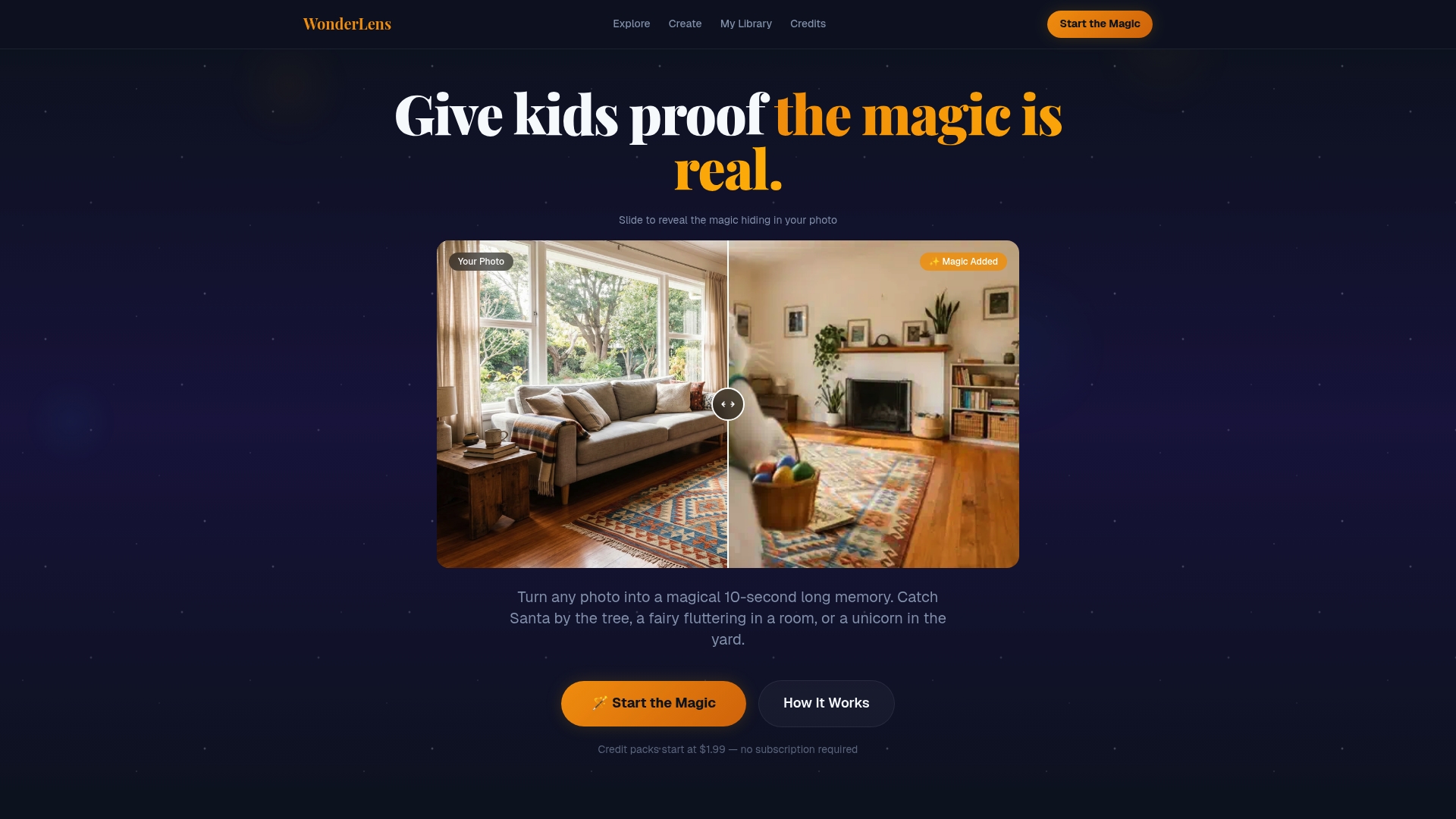
You upload a photo of your living room, choose your character, and Wonderlens generates a 10-second animated memory that looks like Santa actually walked through your front door. Credits start at $1.99, making it an affordable way to create a magical holiday keepsake your kids will ask to watch again and again. It is family-friendly, easy to use, and designed to create the kind of wonder that no store-bought decoration can replicate. Explore animated holiday memories and see what your home looks like with a little holiday magic added in.
FAQ
What is a personalized holiday video?
A personalized holiday video is a festive message that includes specific details about the recipient, such as their name, a shared memory, or a relationship-specific detail, rather than a generic seasonal greeting sent to everyone.
How long should a personalized holiday video be?
Single-person greeting videos work best at 60 to 90 seconds. AI-generated character videos for children, like talking Santa clips, perform well at 30 to 60 seconds to hold young viewers' attention.
What are the best tools for creating personalized holiday videos?
Wonderlens, Pollo AI, Easy-Peasy.AI, and PicCollage each offer different approaches to personalized holiday video creation, from AI character animation to photo collages and talking character generators.
Is it safe to share personalized holiday videos online?
Sharing privately through direct messages or friends-only albums is the safest approach. Deleting a public video does not guarantee removal of all copies, so defaulting to private sharing protects your family's images and data.
How do I make a holiday video slideshow the right length?
Plan for 50 to 75 photos at 4 to 6 seconds each for a 5 to 10 minute slideshow. For a shorter 2 to 3 minute video, select 30 to 45 of your best images and trim to fit the runtime before you start editing.
Recommended
- Why Choose Holiday Video Gifts for Your Family. WonderLens | WonderLens
- AI Christmas Videos: Create Magical Holiday Memories Fast — WonderLens | WonderLens
- Creative photo animation steps for magical family memories — WonderLens | WonderLens
- Best practices for creating unforgettable holiday magic — WonderLens | WonderLens