Best Christmas Photo-to-Video Apps for Easy Holiday Videos
August 2, 2026

For turning Christmas photos into shareable holiday videos, Wonderlens is the top pick for magical, character-driven family surprises, with Canva, InShot, Animoto, and VivaVideo rounding out the shortlist for every other creative goal.
Here's why each made the cut:
- Wonderlens: AI-powered character animation places Santa or fairies directly into your home photos with realistic lighting and shadows. First video is free.
- Canva: Deep holiday template library, drag-and-drop web editor, and easy multi-platform sharing.
- InShot: Advanced mobile editing with AI effects, multi-layer control, and 4K export support.
- Animoto: Automated beat-sync templates that turn a photo stack into a polished story video with minimal effort.
- VivaVideo: Fast, mobile-friendly clips built for social feeds and quick holiday e-cards.
Match your goal to your app:
- Quick e-card: Canva or VivaVideo
- Cinematic family story: Wonderlens or Animoto
- Social feed vertical video: InShot or VivaVideo
Table of Contents
- Which Christmas photo-to-video apps compare best side by side?
- Top picks: which app fits your holiday video goal?
- How to choose the right Christmas photo-to-video app for your needs
- How to make a Christmas photo-to-video in under 5 minutes
- Why Wonderlens is the recommended pick for magical Christmas shorts
- What does the basic photo-to-video workflow look like?
- What export quality and formats can you expect?
- How many templates do these apps offer, and how good are they?
- How do these apps handle your photos and privacy?
- How often do these apps update, and what support do they offer?
- Which apps let you share directly to social media?
- Key Takeaways
- What holiday video trends actually matter right now
- Your first Wonderlens holiday video costs less than a greeting card
- Useful sources and further reading
Which Christmas photo-to-video apps compare best side by side?
The table below covers the dimensions that matter most when choosing a holiday slideshow maker.
| App | Best for | Platforms | Price | Templates & holiday assets | Advanced features | Export & sharing |
|---|---|---|---|---|---|---|
| Wonderlens | Magical character-driven keepsakes | Web | Credits from $1.99; first video free | Holiday characters (Santa, fairies, unicorns) placed in your photos | AI character animation, realistic lighting & shadow rendering | Download + social share; 10-sec video |
| Canva | Template-driven cards & multi-platform sharing | Web, iOS, Android | Free tier; Canva Pro subscription | Hundreds of Christmas slideshow templates, stock music, stickers | Drag-and-drop motion graphics, brand kits | MP4, GIF, social direct-share |
| InShot | Power mobile editing with fine export control | iOS, Android | Free with watermark; Pro subscription removes it | Christmas frames, stickers, music library | AI effects, multi-layer editing, up to 4K/60fps export | MP4 up to 4K; direct social share |
| Animoto | Story-driven slideshows with auto beat-sync | Web, iOS, Android | Free tier; paid plans for HD and branding | Holiday slideshow templates with automated timing and motion | Beat-sync automation, text overlays | HD MP4; social and email share |
| VivaVideo | Fast social-ready clips and short e-cards | iOS, Android | Free with watermark; Pro in-app purchase | Themed templates, festive stickers, music | Basic transitions, speed control | MP4; direct social share |
Holiday-readiness snapshot: Canva and Animoto lead on template volume for traditional Christmas slideshows. Wonderlens stands alone on AI character realism. InShot wins on raw export quality for mobile editors.
A quick note on platform limits: Wonderlens is browser-only, so no app download is needed. InShot is mobile-only, which means desktop editing isn't an option. Canva and Animoto work across web and mobile, giving you the most flexibility to start on one device and finish on another.
Top picks: which app fits your holiday video goal?
Wonderlens
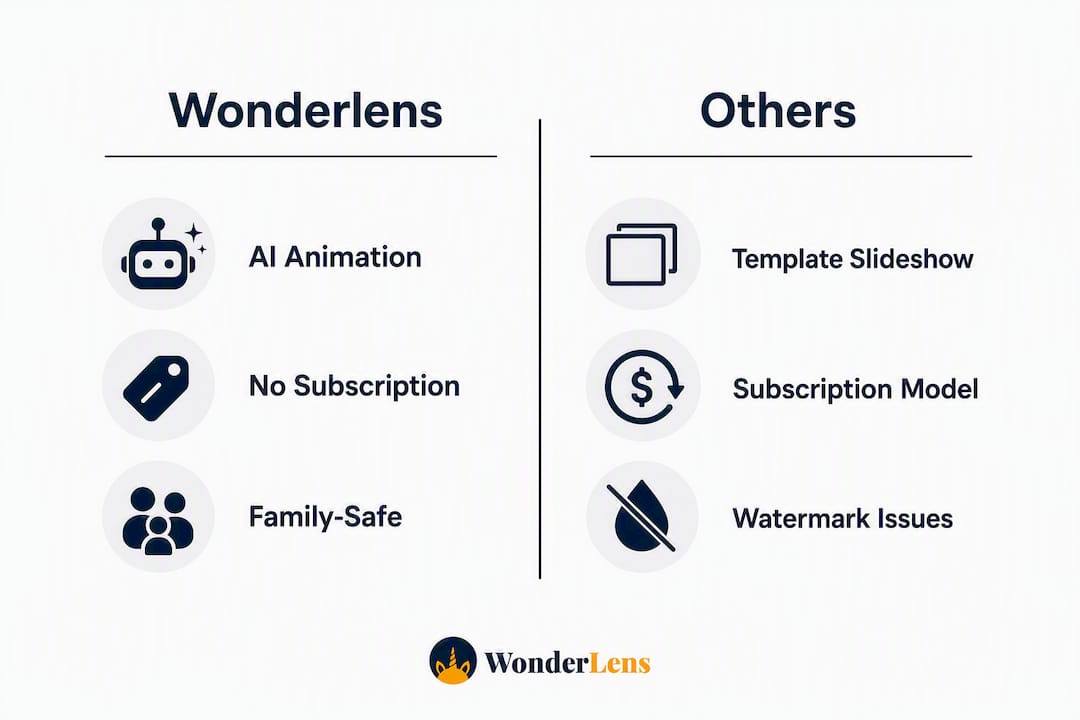
Wonderlens does something none of the others do: it places animated holiday characters directly into a photo of your living room, complete with matching shadows and lighting, so Santa appears to be standing next to your actual couch. The output is a 10-second video built for sharing and for making kids' eyes go wide. The credit-based model means no subscription commitment. Entry credits start at $1.99, and your first video is free to try. It's browser-based, so there's nothing to download.

Pros: Uniquely realistic AI animation; no subscription required; family-safe and easy to use. Cons: Videos are 10 seconds (not a long-form slideshow); character selection is holiday/fantasy focused.
Canva
Canva is the go-to for anyone who wants a polished Christmas slideshow without touching a timeline. Its holiday template library is extensive, covering everything from animated greeting cards to full family recap videos. App Store listings confirm that photo selection, festive frames, music, and social sharing are the features families reach for most, and Canva delivers all four cleanly. The free tier is genuinely useful, though some premium templates and music tracks require a Pro subscription.
Pros: Huge template library; works on web and mobile; easy sharing to every platform. Cons: Premium assets locked behind Pro; less control over video timing than dedicated editors.
InShot
InShot is for the parent who wants real editing power on their phone. Multi-layer editing, AI presets, and export options up to 4K put it in a different league from most mobile apps. The free version adds a watermark; a Pro subscription removes it and unlocks the full asset library. If you're building a longer Christmas memory video with precise cuts and custom music timing, InShot handles it.

Pros: Advanced mobile editing; high-resolution export; AI effects. Cons: Watermark on free exports; steeper learning curve than template-first apps.
Animoto
Animoto's strength is its automated beat-sync templates that handle the hardest part of slideshow-making: timing photos to music. Upload your photos, pick a holiday template, and Animoto does the rest. It's genuinely the fastest path to a story-driven Christmas video that looks like someone spent hours on it. The free tier limits resolution; paid plans unlock HD export.
Pros: Beat-sync automation; clean storytelling templates; web and mobile. Cons: Less creative control than InShot; HD requires a paid plan.
VivaVideo
VivaVideo is built for speed. Pick a festive template, drop in your photos, add a music track, and you're done in minutes. It's best suited for short social posts and quick holiday e-cards rather than longer family keepsakes. The free version includes a watermark; a Pro in-app purchase removes it.
Pros: Fast workflow; mobile-friendly; good for social-format clips. Cons: Watermark on free tier; limited export resolution compared to InShot.
Pro Tip: Before you start editing, check whether the app's free tier exports with a watermark. If you're sharing with family, a watermarked video undercuts the magic. Wonderlens, Canva's free tier, and Animoto's free tier all let you share without a watermark on basic outputs.
How to choose the right Christmas photo-to-video app for your needs
The right app depends on what you're making and where it's going. Here are the criteria worth checking before you commit:
- Templates and holiday assets: — Look for Christmas-specific frames, stickers, and music, not just generic seasonal filters. Canva and Animoto lead here for volume; Wonderlens leads for character realism.
Red flags to avoid: hidden export fees that appear only at checkout, watermarks that can't be removed without a paid plan, and credit models that expire before you use them.
Pro Tip: Pick your output aspect ratio before you choose photos. Cropping a portrait photo to 16:9 cuts off heads. Decide where the video is going first, then select photos that fit that frame.
How to make a Christmas photo-to-video in under 5 minutes
Any of these apps can get you from photos to a finished holiday video quickly. Here's the fastest path:
- Pick a Christmas template — Template-first apps like Canva and Animoto automate timing and motion graphics, so you don't have to set durations manually.
Pro Tip: Sync your photo cuts to the beat of the music by tapping the beat while previewing. Animoto does this automatically. In InShot, use the beat marker tool to drop cut points on the waveform.
Why Wonderlens is the recommended pick for magical Christmas shorts
Most Christmas photo-to-video apps add frames and music around your photos. Wonderlens does something different: it puts a character inside the photo, moving through your actual space.
Here's what makes it stand out:
- AI character animation: Santa, fairies, unicorns, dragons, and more are rendered as moving figures, not static stickers.
- Realistic lighting and shadow integration: The character catches the same light as your room, so it looks like they're actually there.
- 10-second personalized video output: Short enough to watch on repeat, long enough to land the magical moment.
- Browser-based workflow: No app download, no account setup friction. Upload a photo, pick a character, generate.
- Credit-based pricing: Entry credits start at $1.99. Your first video is free, so you can see the quality before spending anything.
For families who want a magical AI Christmas video that genuinely surprises kids, the realism gap between Wonderlens and a standard sticker overlay is significant. A fairy hovering in your living room with accurate shadows is a different experience than a flat animated GIF dropped onto a photo.
Pro Tip: For the most realistic result, upload a photo taken in natural light with a clear, uncluttered background. The AI reads the room's lighting to match the character's shadows, so better light in the photo means a more convincing animation.
What does the basic photo-to-video workflow look like?
The core workflow is the same across all five apps: select photos, choose a template, add music, then export. The differences show up in how much control you have at each step.
Canva and Animoto are the most hands-off. You drop photos into a template and the app handles duration, transitions, and music sync automatically. That's ideal if you want a finished video in under five minutes without touching a single setting.
InShot gives you a timeline. You can trim each photo's duration individually, layer text and stickers, and adjust the music fade manually. More control, but more steps.
Wonderlens skips the slideshow format entirely. You upload one photo, select a character, and the platform generates a short animated video. There's no timeline to manage because the AI builds the scene for you.
VivaVideo sits between Canva and InShot: template-driven but with a few manual controls for speed and transitions. Good for quick social posts where you want a little more personality than a plain slideshow.
What export quality and formats can you expect?
Export quality varies more than most app listings admit. InShot is the clear leader for raw resolution, supporting up to 4K and 60fps on compatible devices with a Pro subscription. For most family sharing purposes, 1080p at 30fps is plenty, and every app on this list hits that with a paid plan.
Canva exports clean 1080p MP4 on its free tier for most templates. Animoto's free tier limits resolution; upgrading to a paid plan unlocks full HD. VivaVideo's free export is lower resolution and includes a watermark.
Format support is fairly uniform: MP4 is the universal output. Canva also exports GIF for short animated cards, which is useful for email sharing. Wonderlens delivers a downloadable MP4 optimized for mobile viewing and social sharing.
One practical note: if you're planning to play the video on a family TV, export at 1080p minimum and use a 16:9 canvas. A 9:16 vertical video on a widescreen display will have thick black bars on both sides.
How many templates do these apps offer, and how good are they?
Template volume matters less than template quality and holiday specificity. A library of 500 generic templates is less useful than 30 well-designed Christmas ones.
Canva has the deepest holiday-specific library of the group, with Christmas slideshow templates covering everything from animated family recaps to minimalist greeting cards. The designs are clean and professionally crafted.
Animoto's holiday templates are fewer but purpose-built for photo storytelling, with motion and timing already calibrated for emotional impact. Platforms like these offer themed templates and a large media library that remove the need for editing skill entirely.
InShot's templates lean toward social-format clips rather than full slideshows. VivaVideo offers themed mobile templates that work well for quick posts.
Wonderlens doesn't use templates in the traditional sense. Instead, you choose a character and scene type, and the AI generates a unique video around your specific photo. Every output is one-of-a-kind.
How do these apps handle your photos and privacy?
Your family photos deserve careful handling. Here's what to know:
Wonderlens markets itself as family-safe and processes photos to generate the animated video output. Its privacy positioning is explicitly family-friendly, which matters when you're uploading images of children.
Canva stores uploaded media in your account. Its privacy policy covers how content is used; review it if you're uploading photos of minors. Canva does not use personal photos for advertising.
InShot processes photos locally on your device for most editing functions, which limits server-side exposure. Check the current App Store privacy label for the latest data practices.
Animoto stores uploaded photos on its servers to generate videos. Its privacy policy covers data retention; photos can be deleted from your account.
VivaVideo has faced scrutiny in the past over data practices. Review its current privacy policy before uploading photos of children.
A general rule: use apps from established publishers, read the privacy label in the App Store or Play Store before uploading family photos, and delete uploaded media from cloud storage once your video is finished.
How often do these apps update, and what support do they offer?
InShot and Canva update frequently, with both apps pushing regular feature releases and bug fixes. InShot's App Store listing reflects an active development cycle with AI features added in recent updates. Canva's web platform updates continuously without requiring user action.
Animoto has a smaller development team but maintains its core holiday template library reliably each season. VivaVideo updates on a less predictable schedule; check the App Store "Last Updated" date before relying on it for a time-sensitive project.
Wonderlens is a focused platform with a specific use case, and its updates tend to add new characters and scene types rather than overhaul the core workflow. Support is available through the website.
For any app, the fastest support path is the in-app help center or the developer's website. Canva's support documentation is the most extensive of the group.
Which apps let you share directly to social media?
Direct social sharing is table stakes for holiday video apps in 2026. Here's how each handles it:
Canva supports direct publishing to Instagram, Facebook, Pinterest, and more from the web editor. It's the most complete social integration of the group.
InShot exports directly to Instagram, TikTok, YouTube, and Facebook. Its aspect ratio presets are built around social platform specs, so you can switch between 9:16 for Stories and 16:9 for YouTube in one tap.
Animoto generates a shareable link and supports direct email sharing, plus download for manual posting. Native social publishing is available on paid plans.
VivaVideo supports direct share to Instagram, TikTok, and Facebook from the app. It's optimized for vertical social formats.
Wonderlens generates a downloadable MP4 and a shareable link. You post it manually to your platform of choice, which takes one extra step but gives you full control over the caption and audience.
Key Takeaways
Wonderlens is the strongest pick for families who want a short, character-driven Christmas video that genuinely surprises kids, while Canva and Animoto cover traditional slideshow needs with the deepest template libraries.
| Point | Details |
|---|---|
| Best for quick e-cards | Canva and VivaVideo offer the fastest template-to-export path with no learning curve. |
| Best for storytelling slideshows | Animoto's beat-sync automation turns a photo stack into a polished story video automatically. |
| Keep videos short | Guides recommend staying under 2 minutes to maintain viewer engagement and completion rates. |
| Check watermark and export policies | InShot and VivaVideo add watermarks on free tiers; always confirm before building a long video. |
| Wonderlens for magical shorts | AI character animation with realistic lighting makes Wonderlens the top pick for character-driven holiday surprises. |
What holiday video trends actually matter right now
The most interesting shift in holiday video-making isn't the AI tools. It's the move toward shorter, more intentional outputs. Families used to dump 200 photos into a slideshow and call it a Christmas movie. Now the most memorable videos are the ones that feel curated: 10–15 photos, one consistent transition style, and a clear emotional arc from the first frame to the last.
Chronological storytelling beats a random photo dump every time. Start with the anticipation (decorating, wrapping), move through the moment (Christmas morning, the meal), and end on the warmth (family together, the quiet evening). That structure gives viewers something to feel, not just watch.
The other thing worth saying: festive doesn't have to mean cluttered. Too many stickers and animations pull attention away from the people in the photos. One consistent transition style, one music track, and minimal overlays will always look more polished than a video that throws every holiday effect at the screen. The magic is in the moments you captured, not the decorations you add afterward.
Your first Wonderlens holiday video costs less than a greeting card
Canva, InShot, Animoto, and VivaVideo are all solid tools for Christmas slideshows. But if you want a video that makes a child stop and stare because Santa is standing in your actual living room, those apps can't do it.

Wonderlens places animated holiday characters into your home photos using AI that matches your room's real lighting and shadows. The result is a 10-second video that looks like it was filmed on Christmas Eve. Your first video is free. After that, videos are credit-based with pay-per-use pricing, no subscription, and no expiration pressure. It's family-safe, browser-based, and takes about two minutes from photo upload to finished video.
Create your first magical Christmas video at Wonderlens and see what your living room looks like with Santa in it.
Useful sources and further reading
- Holiday video slideshows — Animoto: Templates, beat-sync guidance, and storytelling tips for photo slideshows.
- Christmas video maker — Vimory: Design guidance on keeping festive effects minimal and focused.
- Create Christmas slideshow video — FlexClip: Template-based holiday slideshow creation with stock music and animations.
- Tips for personalized holiday videos families will love — Wonderlens: Storytelling, photo selection, and editing advice for family-focused holiday videos.
- Animated memories workflow — Wonderlens: Step-by-step workflow for creating animated holiday keepsakes.
- Family painting night at home — Crafty by Numbers: Offline holiday activity ideas that pair well with a video gift.
- Top holiday activity books for kids — Munkte Products: Family holiday activity ideas for kids alongside your video projects.
Recommended
- Tips for Personalized Holiday Videos Families Will Love. WonderLens | WonderLens
- AI Christmas Videos: Create Magical Holiday Memories Fast — WonderLens | WonderLens
- Creative photo animation steps for magical family memories — WonderLens | WonderLens
- Best Santamagic.com Alternatives for Personalized Santa Videos. WonderLens | WonderLens