Fantasy Character Overlays: Definition and Creative Uses
July 10, 2026
Fantasy character overlays are defined as non-destructive digital graphic or animated layers placed atop photos or videos to add magical or fantastical features without modifying the original image. The industry term for this technique is "digital compositing overlay," though "fantasy character overlay" has become the widely used shorthand among creative communities. Understanding the precise definition of fantasy character overlays helps families and creative individuals choose the right tools, apply them correctly, and get results that genuinely look magical rather than obviously edited.
What is the definition of fantasy character overlays?
A fantasy character overlay is a digital graphic layer added on top of a base photo or video clip. It introduces fantastical visual elements, such as glowing wings, dragon scales, fairy dust, or animated creatures, without touching the original image file. The word "non-destructive" is the key technical term here. Your original photo stays completely intact, and the overlay sits above it as a separate, removable element.
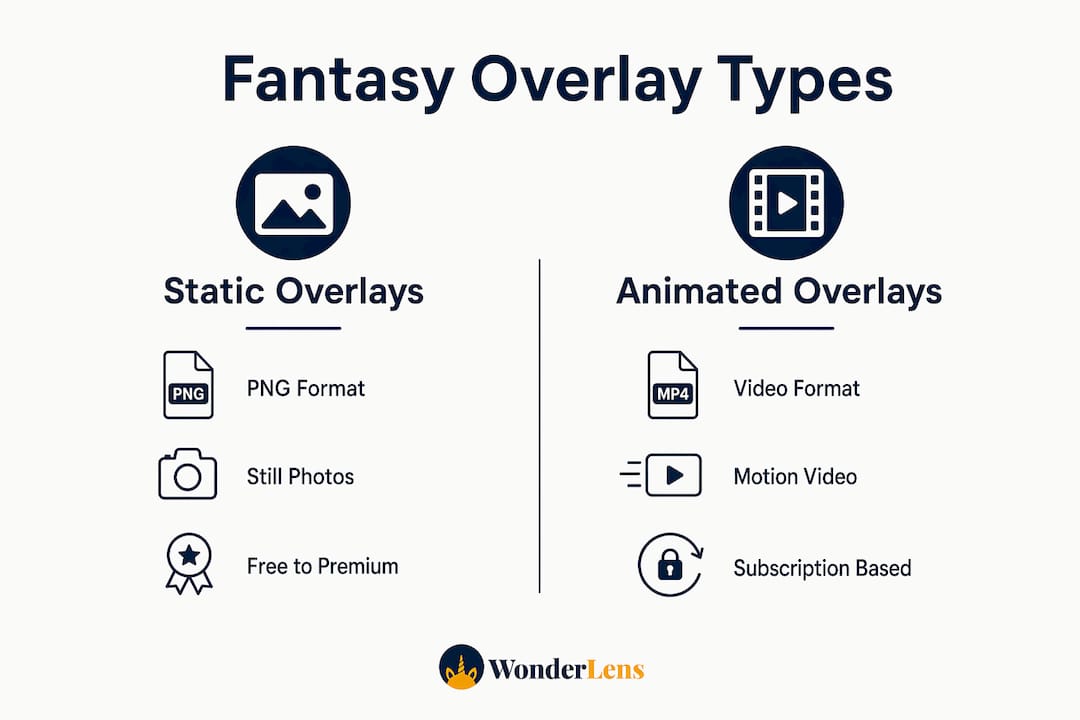
Overlays typically appear in two forms. Static overlays are transparent PNG files with a fantasy element already rendered at a fixed angle and lighting. Animated overlays are short video clips, often in MOV or WebM format with an alpha channel, that show movement like a unicorn trotting or fairy wings fluttering. Both forms serve different creative needs, and choosing between them depends on whether your final output is a still image or a video.
The importance of character design within overlays cannot be overstated. A well-designed overlay carries its own visual identity, including a recognizable silhouette, a consistent color palette, and details that read clearly at a glance. Without those qualities, even a technically correct overlay looks flat and unconvincing in a family photo.
What are the common types of fantasy character overlays?
Fantasy overlays cover a wide range of visual styles and subject matter. Knowing the categories helps you pick the right asset for your project.
Static overlays are the most common entry point for beginners. They include:
- Magical glows and auras (golden light halos, fairy sparkles, moonbeams)
- Fantastical clothing and accessories (dragon armor, wizard robes, enchanted crowns)
- Creature silhouettes (unicorns, phoenixes, fairies, dragons)
- Environmental effects (enchanted fog, falling petals, magical snow)
Animated overlays add motion and are used in video projects or platforms that support animated images. Examples include a dragon breathing fire across the frame, a fairy scattering glowing dust, or Santa's sleigh crossing a living room ceiling.
Pricing and availability vary considerably. Fantasy overlay assets range from free community-shared files to premium packs priced between $5 and $50, with differences in resolution, render quality, and licensing terms. Free assets work for personal projects but often carry restrictions on commercial use. Premium packs from professional illustrators or 3D artists deliver higher resolution and more realistic lighting, which matters when you want the overlay to blend convincingly with a real photograph.
| Overlay type | Format | Best use | Typical cost |
|---|---|---|---|
| Static PNG | Transparent PNG | Still photos | Free to $20 |
| Animated clip | MOV or WebM | Short videos | $10 to $50 |
| 3D rendered asset | PNG or video | Cinematic projects | $20 to $50+ |
| Community freebie | PNG or GIF | Personal practice | Free |
How are fantasy character overlays integrated into photos and videos?
The technical workflow for adding overlays follows a clear sequence. Getting each step right is what separates a magical result from a pasted-on mess.
- Select your overlay asset. Choose a file whose lighting direction and angle match your base photo. A dragon lit from the left looks wrong in a photo where the window light comes from the right.
- Open your editing software. Tools like Adobe Photoshop handle static PNG overlays with full layer control. Video editors handle animated clips with timeline-based layer stacking.
- Place the overlay on a new layer above the base image. This is the foundation of non-destructive editing, which means you can toggle, move, or delete the overlay without affecting the original photo.
- Align perspective and scale. Resize the overlay so the fantasy character fits naturally within the scene. A fairy that is the same height as a doorframe loses all sense of scale and magic.
- Apply a blend mode. Blend modes like Screen, Overlay, and Multiply control how the overlay's pixels interact with the base image. Screen works well for glowing light effects. Multiply works for shadows and darker textures.
- Adjust opacity. Setting opacity between 60% and 80% allows the base photo's texture and lighting to show through the overlay, creating realistic depth. Full opacity often makes overlays look flat and pasted on.
- Manage Z-layer positioning. Z-layer management determines whether the overlay sits in front of or behind specific elements in the photo, such as placing a dragon behind a sofa but in front of the wall. This single technique creates the illusion of genuine depth.
Pro Tip: Save your project file with all layers intact before flattening or exporting. A layered file lets you swap one fantasy character for another in seconds, without starting over from scratch.
What artistic principles guide effective fantasy character overlay design?
Strong fantasy character design is not about adding the most dramatic element available. It is about choosing an overlay that belongs in the world your photo already suggests.
Worldbuilding drives overlay credibility. When an overlay's design connects to the story, color palette, and cultural feel of the base image, viewers accept it as part of the scene. A dragon with medieval armor fits a stone castle backdrop. That same dragon looks jarring in a bright modern kitchen unless the rest of the image supports a contrast between worlds.
Color harmony is the next major factor. Your overlay's dominant hues should either complement or deliberately contrast with the base photo's palette. A warm golden fairy glow works beautifully in a photo with amber autumn light. A cold blue magical aura creates striking tension in a warm-toned holiday scene, but only if that tension serves the mood you want.
Silhouette and shape language determine whether a fantasy character reads clearly at a glance. A well-designed silhouette is instantly recognizable even without color or detail. Overlays with muddy or overly complex outlines lose their visual impact, especially in smaller prints or social media thumbnails.
Fashion and movement cues matter more than most beginners expect. An animated fairy whose wings move at a speed inconsistent with her body posture breaks immersion immediately. Static overlays with clothing that defies gravity or wind direction look equally wrong. The fix is simple: study the base photo's implied physics before selecting an overlay.
Pro Tip: Before placing any overlay, squint at your base photo and identify its dominant light source. Every overlay you add should cast shadows and highlights that match that same light direction.
Common mistakes that break immersion include:
- Placing overlays at the wrong scale relative to people or furniture in the photo
- Using overlays with lighting that contradicts the base image's natural shadows
- Stacking too many overlays until the photo loses its grounding in reality
- Choosing overlays purely for visual drama without considering narrative fit
How can families apply fantasy overlays to enhance personal photos?
Families get the most out of character overlays when they treat them as storytelling tools rather than decorations. The goal is a photo that makes a child's eyes go wide, not one that simply looks busy.
Holiday and seasonal themes are the most natural starting point. A unicorn appearing in the living room on Christmas morning, a dragon perched on the mantelpiece for a birthday, or a fairy scattering light across an Easter basket all create a specific narrative moment. The overlay does not need to be large or complex. A small, well-placed fairy with correct lighting often reads as more believable than a massive dragon with mismatched shadows.
Practical tips for families applying overlays to personal photos:
- Start with a well-lit base photo. Overlays enhance mood but cannot fix poor lighting or blurry images. A sharp, evenly lit photo gives the overlay the best foundation.
- Choose one hero overlay per image. One unicorn in the hallway creates wonder. Three unicorns, two dragons, and a fairy in the same frame creates chaos.
- Match the overlay's emotional tone to the occasion. Soft, glowing fairies suit quiet, tender moments. Bold, fire-breathing dragons suit energetic birthday scenes.
- Keep the child or subject as the focal point. The overlay should frame and support the person in the photo, not compete with them for attention.
- Use animated overlays for video when you want to share on social platforms. A 10-second clip of a dragon walking through your living room generates far more engagement than a still image.
Platforms like Wonderlens take this concept further by using AI-driven rendering to place animated fantasy characters directly into your home environment with accurate shadow casting and lighting. The result is a short video that looks like the character genuinely visited your space, which is the kind of memory a child talks about for years.
Key Takeaways
Fantasy character overlays work best when the overlay's lighting, scale, and narrative purpose match the base photo they are placed on.
| Point | Details |
|---|---|
| Core definition | Fantasy character overlays are non-destructive digital layers added atop photos without altering the original image. |
| Two main types | Static PNG overlays suit still photos; animated clips suit video projects and social sharing. |
| Technical essentials | Opacity between 60% and 80% and correct blend modes create realistic depth and natural integration. |
| Design principle | Worldbuilding and color harmony determine whether an overlay feels believable or out of place. |
| Family application | One well-placed, correctly lit overlay creates stronger emotional impact than multiple competing elements. |
Why overlays changed how I think about photo storytelling
I spent years treating photo editing as a correction process. Fix the exposure, sharpen the subject, remove the distracting background element. Overlays forced me to think differently. They are not corrections. They are additions to a story the photo is already telling.
The biggest misconception I see is that people reach for overlays when a photo is not working. That is exactly backward. Overlays chosen to support worldbuilding create something genuinely moving only when the base image is already strong. A well-composed photo of a child looking up at the ceiling becomes extraordinary when a dragon appears to be landing on the bookshelf above them. The same overlay on a blurry, poorly lit snapshot just looks like a mistake.
My honest advice: spend more time on your base photo than on your overlay selection. Get the light right. Get the composition right. Then let the overlay do what it does best, which is add one layer of magic to a moment that already has emotional weight. The families who get the most memorable results are not the ones with the most elaborate overlays. They are the ones who understood the story they wanted to tell before they opened the editing software.
— Jeremiha
Wonderlens brings fantasy characters into your family photos
Wonderlens is built for exactly the kind of creative storytelling this article describes. The platform uses AI-driven rendering to place animated fantasy characters, including unicorns, dragons, fairies, and Santa, directly into your home environment with accurate lighting and shadow casting.

You upload a photo of your space, and Wonderlens generates a 10-second animated video where the character moves through your actual room. The shadows fall correctly. The lighting matches your space. The result looks like the character genuinely visited. Credits start at $1.99, and the platform is designed to be family-friendly and easy to use with no editing experience required. If you want to add fantasy characters to your family photos without managing layers or blend modes yourself, Wonderlens handles the technical work for you.
FAQ
What is the definition of a fantasy character overlay?
A fantasy character overlay is a non-destructive digital graphic or animated layer placed on top of a photo or video to add magical elements without altering the original image. It typically appears as a transparent PNG for still photos or an animated clip for video projects.
What are the main types of fantasy overlays?
The two main types are static PNG overlays, used for still photos, and animated video overlays, used for short video clips. Static overlays include glows, creatures, and costumes, while animated overlays show movement like wings fluttering or creatures walking.
What blend modes work best for fantasy overlays?
Screen works best for glowing light effects, Multiply works for shadows and dark textures, and Overlay blends midtones naturally. Adjusting opacity to between 60% and 80% prevents the overlay from obscuring the base photo's texture and lighting.
Do overlays work on any photo?
Overlays work best on well-lit, sharply focused base photos. They enhance mood and narrative but cannot fix poor image quality. A properly composed photo with clear lighting gives any overlay the strongest foundation for a realistic result.
How is Wonderlens different from standard overlay editing?
Wonderlens uses AI-driven rendering to automatically match a fantasy character's lighting and shadows to your specific home environment, producing a short animated video rather than a static edited image. Standard overlay editing requires manual layer management, blend mode selection, and opacity adjustment in tools like Photoshop.
Recommended
- How to Add Fantasy Characters to Photos at Home. WonderLens | WonderLens
- Why integrating fantasy into home photos creates magic — WonderLens | WonderLens
- Transform holidays: fantasy characters create magical family memories — WonderLens | WonderLens
- What realism in digital media means for holiday magic — WonderLens | WonderLens