Festive Photo Animation Services: Make Magic in Minutes
August 5, 2026
The easiest way to create a festive animated photo right now is Wonderlens, a browser-based platform that turns a single family photo into a cinematic 10-second clip with holiday characters, realistic lighting, and shadows that actually match your room. No app download, no design skills, no waiting days for a result.
Here is what you get with Wonderlens:
- An animated video with characters like Santa, the Easter Bunny, fairies, or dragons placed directly into your home photo
- Realistic shadow and light integration so the character catches the same warm glow as your living room
- A shareable MP4 ready for Instagram, text, or a private family link
- Your first video free, with credit packs starting at $1.99 for additional animations
Upload a photo, pick a character, preview the magic, and you are done. The whole process takes a few minutes in any browser.
Table of Contents
- What do festive photo animation services actually do?
- Web vs. mobile: which platform works best for you?
- Privacy and data safety: what to check before you upload
- Tips that make festive animations look natural and feel magical
- Creative ways to use your animated holiday photos
- Why Wonderlens stands out for holiday photo animations
- Key Takeaways
- What makes animated holiday photos worth creating
- Your first Wonderlens video is free
- Useful sources
What do festive photo animation services actually do?
Festive photo animation services, sometimes called holiday character animation services or AI family photo animation solutions, transform a still photo into a short moving clip by layering animated elements onto your original image. The best ones go well beyond a basic sticker overlay.
Common features to look for include holiday templates (Christmas, Easter, Halloween), face animation with natural movements like blinking and a gentle head tilt, and environmental effects such as falling snow, fireplace flicker, or twinkling tree lights. Character overlays, where a fully animated Santa or fairy walks through your actual living room, represent the most immersive end of the spectrum. Advanced platforms match the character's lighting to the ambient light already in your photo, so the effect reads as real rather than pasted-on.
Output specs matter for sharing. Most services produce short MP4 clips suitable for Instagram Reels, TikTok loops, and WhatsApp messages. Social-ready aspect ratios, 1:1 for feed posts and 9:16 for Stories and Reels, are standard on quality platforms. The typical workflow is straightforward: upload your photo, select an effect or template, mark the subjects if needed, preview the render, then download or share. According to an industry overview of holiday animation formats, short animated clips consistently outperform static cards for engagement on social platforms.
Web vs. mobile: which platform works best for you?
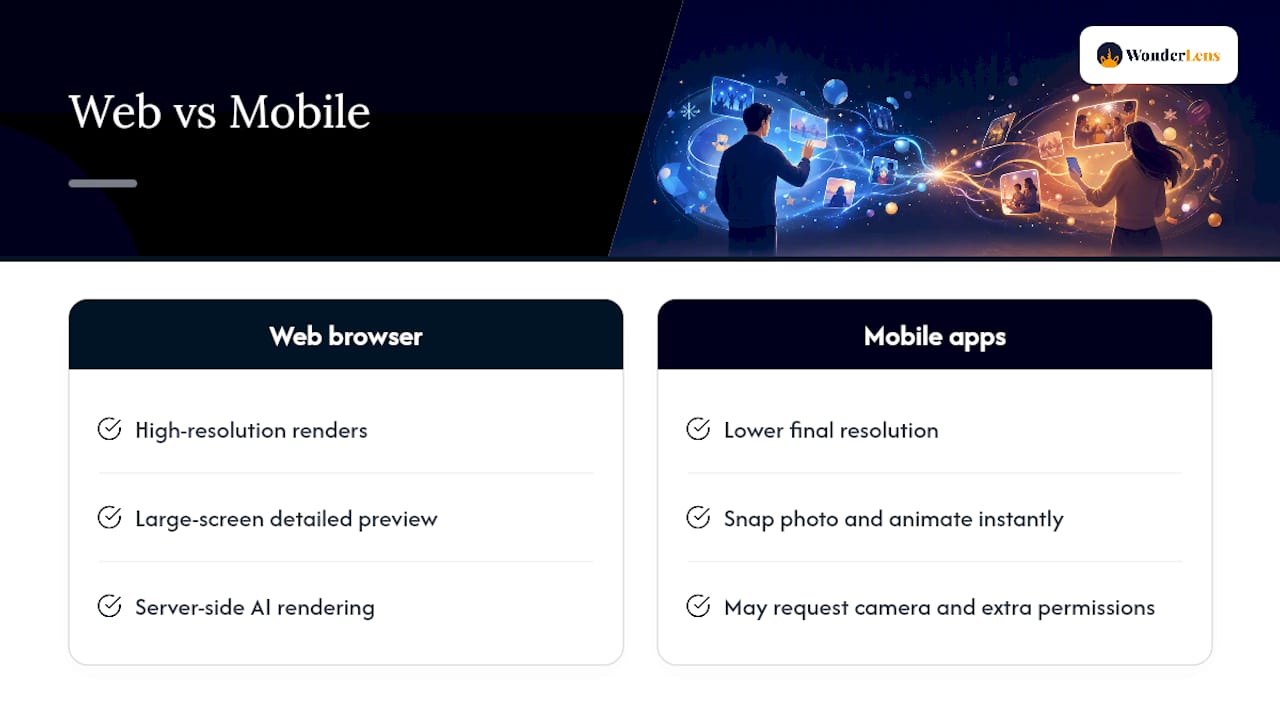
Web browser tools are the better choice when you want higher-resolution renders and a bigger screen to preview the result. No installation means you can create from any laptop or desktop, and browser-based platforms like Wonderlens handle the heavy AI rendering on their servers rather than your device. Parents who want to surprise kids with a polished holiday clip tend to prefer this route.
iOS and Android apps shine when speed and on-device camera capture matter most. You can snap a photo and animate it in the same session, and in-app template libraries make seasonal browsing easy. The trade-off: watch the permissions screen carefully. Many apps request camera, contacts, and background-upload access that goes well beyond what animation actually requires.
A few cross-platform details worth checking before you commit to any service: upload file-size limits (some cap at 10 MB, which can compress a modern smartphone photo), final output resolution differences between web and mobile tiers, and whether the free or lower tier adds a watermark. Watermarked previews are fine for evaluating quality; you just need to know upfront whether a paid credit removes them.
Privacy and data safety: what to check before you upload
Family photos are personal. Before uploading to any festive animation service, spend two minutes on the privacy policy. The key questions: How long does the platform store your uploaded images? Can staff or AI trainers review your content? Does uploading grant the platform a license to use your photos?
On mobile, Google's privacy policy and platform-level data controls explain how Android apps handle permissions and what data categories each app accesses. The Google Play support pages show you how to read data-safety labels and check what an app actually requests before you install it. If you have already granted access and want to review or revoke it, your Google account settings list every connected app and let you remove access in one click.
Practical steps that protect your family:
- Use the watermarked preview before uploading your best photos, so you can evaluate the service with a lower-stakes image first.
- Delete your uploaded originals from the platform after downloading your video, if the service offers that option.
- Only upload photos of people who have given consent, especially children.
- Avoid apps that request contacts or background-upload permissions, since neither is needed for photo animation.
Wonderlens is marketed as family-safe and browser-based, which means no app install and no persistent background data access on your device.
Tips that make festive animations look natural and feel magical
Lighting is the single biggest factor in whether an animated character looks like it belongs in your photo or looks pasted on. Warm, directional light, the kind that comes from a fireplace, a Christmas tree, or a window at golden hour, gives the AI the best material to work with. Harsh overhead lighting or strong backlighting confuses subject detection and flattens the integration.
Composition shapes the emotional impact just as much. Face-first framing, where the people in the photo are clearly visible and centered, produces the most resonant results. Crop to your intended social ratio before uploading rather than after, so the AI renders the effect at the right dimensions from the start. Including holiday elements already in the frame, a lit tree, wrapped gifts, a decorated mantle, gives the platform more context for placing environmental effects naturally. For deeper guidance on realistic holiday animation lighting, Wonderlens covers shadow and glow integration in detail.
Pro Tip: Combine photos from two or three different holiday seasons into a short keepsake sequence rather than relying on a single snapshot. The result tells a story across years, which lands far more emotionally than one perfect frame.
One more thing: focus on small moments. A child reaching for an ornament, a family gathered around a table, a gift being opened. These intimate shots animate with far more warmth than wide-angle room panoramas, because the character or effect has a human anchor.
Creative ways to use your animated holiday photos
Once you have a 10-second animated clip, the ways to share it are wider than most people expect.
- Instagram Reels and TikTok: 6–10 second loops are ideal for these formats. Export at 9:16 for full-screen playback and add a simple caption. Animated holiday photos consistently draw more engagement than static cards.
- Holiday gatherings: — Play the clip on a tablet during a family dinner or link it via QR code in a printed photo book. It becomes a conversation piece and a tradition.
- Profile video updates: — Swap your profile photo for the animated version during the holiday season on platforms that support video profiles.
For a broader look at holiday animation formats and when each works best, Wonderlens has a family-focused guide covering everything from quick social clips to longer keepsake sequences.
Why Wonderlens stands out for holiday photo animations
Wonderlens creates cinematic 10-second clips where fantasy and holiday characters, Santa, the Easter Bunny, fairies, unicorns, dragons, superheroes, and more, are placed directly into your home photos with lighting and shadows that match the room. That level of realism is what separates it from basic filter apps.
The practical advantages are real. It runs entirely in a browser, so there is no app to install and no background permissions to worry about. The credit model starts at $1.99, and your first video is free, which means you can judge the render quality before spending anything. The AI handles lighting and shadow integration automatically, so even a parent with no photo-editing experience gets a polished result.
What you gain over a basic filter or sticker overlay is character depth. A Wonderlens Santa does not just float in the corner of your photo. He walks through your actual living room, casting a shadow that matches your floor, catching the same warm glow as your tree. That is the detail that makes a child's face light up. For more on how AI-powered animation creates those magical family memories, the Wonderlens blog covers the technology behind the effect.
Key Takeaways
Wonderlens is the fastest, most family-friendly way to create a cinematic festive animated photo, with realistic character integration and a free first video to try before buying credits.
| Point | Details |
|---|---|
| Recommended service | Wonderlens delivers cinematic 10-second holiday clips with realistic lighting, starting free and with credits from $1.99. |
| Check before you create | Good lighting, clear privacy terms, and the correct output aspect ratio (9:16 for Stories, 1:1 for feed) matter most. |
| Render speed | Wonderlens renders typically complete within a few minutes for standard outputs; preview before spending credits. |
| Privacy first | Review data-storage terms, delete uploaded originals when possible, and only upload photos with consent. |
| Wonderlens advantage | Browser-based, no app install, free first video, and character animations with matched shadow and light integration. |
What makes animated holiday photos worth creating
The gap between a static holiday card and a 10-second animated clip is bigger than it looks. Static images get a glance. A clip of Santa walking through your child's actual living room gets replayed, shared, and saved. That difference in emotional weight is why festive photo animation services have grown from novelty filters into a genuine holiday tradition for families.
What most people underestimate is how much the quality of the input photo shapes the final result. The AI is only as good as the light it has to work with. A warm, well-lit photo from Christmas morning will produce a character integration that looks like it belongs there. A dark, blurry snapshot will produce something that looks like a special effect. The tool matters, but the photo matters more.
Wonderlens gets this right by building the lighting-match step into the rendering process automatically, which is why it produces results that feel cinematic rather than crafted. For families who want a keepsake that actually holds up over time, that realism is the whole point.
Your first Wonderlens video is free
Wonderlens gives you a cinematic 10-second animated holiday video at no cost for your first creation. Upload a photo of your living room, pick a character, and watch Santa, a fairy, or a dragon step into your family's actual space with shadows and lighting that match the room. No design skills, no app download, just a browser and a photo.

Credit packs start at $1.99 for additional videos, making it easy to create a personalized clip for every holiday, every year. The first video is free so you can see the render quality before spending anything.
Try Wonderlens free today and create a magical moment your family will watch again and again.
Useful sources
- policies.google.com
- support.google.com
- myaccount.google.com
- trustpilot.com
- Christmas Animation Services: Holiday Engagement Ideas