Memory-Making Workflow for Families: 2026 Guide
June 21, 2026

A memory-making workflow for families is a repeatable system for capturing, organizing, and preserving the moments that matter most. Without one, photos pile up in camera rolls, rituals fade, and the stories that hold families together get lost. The good news: you do not need elaborate setups or expensive gear. You need intention, a few simple tools, and a process you can actually stick to. This guide gives you exactly that, blending research-backed insights with practical steps built for busy families.
What are the essential tools for a family memory-making workflow?
The right tools make the difference between a system you use and one you abandon. Start with what you already have: a smartphone camera, a cloud storage service like Google Photos or iCloud, and a simple notebook or journal. These three cover the basics of capturing, storing, and reflecting.
| Tool | Purpose | Format |
|---|---|---|
| Smartphone camera | Capture everyday and holiday moments | Digital |
| Google Photos or iCloud | Auto-backup and organize by date | Digital |
| Printed photo album | Tangible keepsake for display and sharing | Physical |
| Notebook or journal | Record stories, feelings, and context | Physical |
| Calendar or Trello | Schedule recurring memory tasks | Digital |

Physical keepsakes and digital archives serve different emotional needs. A printed photo book on the coffee table gets touched and revisited. A digital gallery gets searched when you need a specific moment. The strongest family memory organization systems use both.
Mental preparation matters as much as tools. Set one clear intention before each season: "This summer, we will make a photo book." Tailoring all your inputs toward one final product significantly improves success and prevents the burnout that comes from trying to save everything.
Pro Tip: Pick one output goal per season, such as a printed album, a short video, or a memory box. Every photo you take and every note you write should feed that single goal.
How can families design simple, repeatable rituals?
Rituals are the backbone of any family memory preservation system. They do not need to be elaborate. Weekly pancake mornings, evening storytime, or a Saturday walk to the same park all qualify. The key is repetition. Intentional family rituals strengthen emotional resilience and happiness in children, and research from Emory University confirms that children exposed to consistent family stories and traditions show higher self-esteem.
A parenting expert cited by Upworthy found that a 10-minute planning session can map out an entire season of core memories using just four anchors. Here is how to apply that framework:
- Choose one tiny weekly ritual. Saturday morning pancakes, a Friday movie night, or a bedtime story with a running character. Keep it simple enough to do even on tired weeks.
- Pick one monthly event. A local festival, a hiking trail you rotate through, or a cooking challenge where kids pick the recipe.
- Add one kid-led choice per season. Let your child choose one activity entirely on their own terms. Their ownership makes the memory stick harder.
- Schedule one no-phone moment per week. Documenting every moment can actually diminish the experience. One phone-free ritual per week boosts presence and improves memory quality for everyone involved.
Selecting three to four anchors per season builds anticipation. Kids start asking "Is it pancake Saturday?" before you even wake up. That anticipation is itself a form of memory making. For magical family traditions that last across years, repetition is the single most powerful ingredient.
Pro Tip: Adapt rituals to your budget and schedule. A $0 ritual like a weekly neighborhood walk counts just as much as a paid experience. Consistency beats cost every time.
What step-by-step workflow organizes and preserves family memories?
Scattered photos and forgotten stories are the most common failure point in family memory organization. A 12-week micro-task workflow solves this without requiring marathon editing sessions.
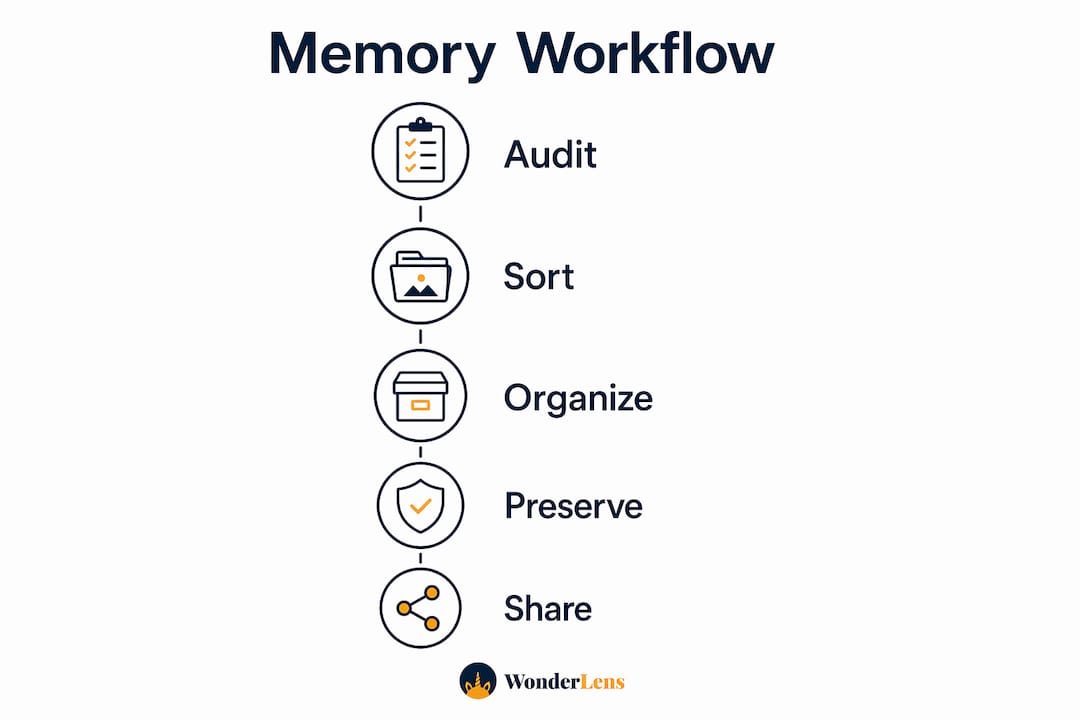
A 12-week workflow turns scattered photos into curated family albums using small, recurring tasks. The key steps include a 30-minute sorting session, a 90-minute metadata tagging session for every 30 images, and a 120-minute scan day per batch of physical photos. Broken into weekly chunks, none of these feel overwhelming.
Here is a practical schedule for busy families:
- Week 1: Audit. Spend 30 minutes reviewing your camera roll. Delete duplicates and obvious blurry shots. Do not organize yet. Just clear the clutter.
- Week 2: Sort by event. Create folders or albums labeled by event, not date. "Easter 2026" is more emotionally useful than "April 2026."
- Week 3: Tag and caption. Add names, locations, and a one-sentence story to your 20 favorite photos from the batch. This is the step most families skip, and it is the most valuable.
- Week 4: Scan physical prints. Use a scanning app like Adobe Scan or a flatbed scanner for older prints. Batch 30 at a time.
- Weeks 5–8: Curate. Select your top 50–100 images for the season. Build a draft album in a service like Artifact Uprising or Chatbooks.
- Weeks 9–10: Add stories. Write short captions or record voice memos explaining the context of key photos. Future you will thank present you.
- Weeks 11–12: Finalize and print. Order your photo book or compile your memory box. Celebrate finishing.
| Week | Task | Time needed |
|---|---|---|
| 1 | Audit and delete duplicates | 30 minutes |
| 2–3 | Sort by event and tag favorites | 90 minutes |
| 4 | Scan physical prints | 120 minutes |
| 5–8 | Curate top images | 60 minutes/week |
| 9–10 | Add captions and voice memos | 45 minutes |
| 11–12 | Finalize and order | 60 minutes |
Digital memory workflows work best with recurring micro-tasks rather than annual catch-up sessions. Set a calendar reminder on the first Sunday of each month. Fifteen minutes of sorting monthly beats a six-hour backlog session in december.
Pro Tip: Use Trello or a simple notes app to track your weekly micro-tasks. A visual checklist makes it easy to pick up where you left off, even after a busy week.
How can families creatively document holiday and everyday memories?
Documentation does not have to mean photos alone. The richest family storytelling methods combine multiple formats to capture what a photo cannot: the sound of your child's laugh, the story behind the chaos, the feeling in the room.
Creative family memory projects that combine photos, voice, and stories create lasting emotional impact. Multi-media approaches deepen family connections far beyond a static image. Here are the most effective methods:
- Voice memos. Record a 60-second audio clip at the end of a holiday. Ask your child one question: "What was your favorite part of today?" These clips become irreplaceable as kids grow.
- Memory boxes. Collect one small physical item from each season: a ticket stub, a pressed leaf, a drawing. A shoebox works perfectly. Label each item with a date and one sentence.
- Collaborative digital galleries. Share a Google Photos album with grandparents and extended family. Everyone contributes photos from the same event, giving you multiple perspectives on one memory.
- Animated memory videos. Tools like Wonderlens transform static family photos into short, cinematic animated videos featuring holiday characters in your actual home environment. A 10-second clip of Santa appearing in your living room creates a moment kids talk about for years.
- Story journals. Keep a shared family journal where each member writes or draws one thing they want to remember from the week. Even a five-year-old can contribute a drawing.
Unplanned, chaotic moments often become the most vivid memories. Shared problem-solving during surprises anchors memories more deeply than any staged photo opportunity. So document the messy moments too. The spilled birthday cake. The wrong turn on the road trip. These are the stories your family will retell for decades.
Involving kids in the documentation process builds their sense of family identity. Let them pick which photos go in the album. Let them narrate a voice memo. Their participation turns passive subjects into active storytellers.
Pro Tip: Balance documentation with presence. Capture the first five minutes of a holiday moment on video, then put the phone down and live the rest of it fully.
What challenges do families face in memory keeping, and how do you fix them?
The most common obstacle is perfectionism. Families wait for the "right" moment to start organizing, and the backlog grows until the task feels impossible. The fix is simple: start with last month, not last decade.
"The enemy of a good memory-keeping system is the perfect one. A photo book with 50 imperfect images beats a folder of 5,000 unsorted ones every time."
Common challenges and their solutions:
- Too many photos, no system. Delete duplicates weekly. Aim for quality over quantity. Fifty great photos tell a better story than 500 mediocre ones.
- No time. Break tasks into 15-minute sessions. Recurring micro-tasks prevent backlog from building. You do not need a free weekend. You need a free Tuesday evening.
- Digital distractions during rituals. Designate one weekly ritual as phone-free. The memories formed during undivided attention are stronger and more emotionally resonant.
- Losing momentum. Celebrate small wins. Finishing a single photo album is worth acknowledging. Tell your kids you made a book about them. Watch their faces.
- Forgetting the stories behind photos. Caption photos within 48 hours of taking them. Memory fades fast. A one-sentence note written the same day is worth more than a paragraph written a year later.
Forty percent of personal happiness is influenced by intentional choices, including regular family rituals. That statistic reframes memory keeping from a chore into an investment in your family's wellbeing.
Key Takeaways
A consistent memory-making workflow for families requires intention, simple tools, and small recurring habits rather than grand gestures or expensive technology.
| Point | Details |
|---|---|
| Start with one output goal | Choose a single final product per season to focus all your capturing and organizing efforts. |
| Build repeatable rituals | Use four seasonal anchors: a weekly ritual, a monthly event, a kid-led choice, and a no-phone moment. |
| Use micro-task workflows | Break photo organization into 15–30 minute weekly sessions to prevent backlog and burnout. |
| Document beyond photos | Add voice memos, story journals, and animated videos to capture what photos alone cannot. |
| Presence beats perfection | Chaotic, unplanned moments form the strongest memories. Document them and then put the phone down. |
Why I think most families are one ritual away from something special
I have watched families invest in elaborate scrapbooking setups, premium camera gear, and complex digital systems, only to abandon everything by february. The gear was never the problem. The missing piece was always a single, repeatable anchor: one thing the family does every week without negotiation.
What actually works is embarrassingly simple. A Saturday morning pancake tradition. A bedtime question: "What made you smile today?" A holiday video that makes your kids gasp. These small, consistent acts do more for family connection than any perfectly curated photo album.
The research backs this up. Children who grow up with consistent family rituals show measurably higher resilience and self-esteem. But you do not need a study to feel it. You just need to start one ritual this week and protect it like it matters. Because it does.
The families I have seen thrive at memory keeping are not the ones with the best cameras. They are the ones who decided that their ordinary Tuesday evenings were worth remembering.
— Jeremiha
How Wonderlens brings magic into your family's memory workflow
Your family's memories deserve more than a camera roll. Wonderlens gives you a way to turn a single photo of your living room into a cinematic, 10-second animated video where Santa walks through your actual space, or a unicorn grazes beside your couch on Christmas morning.
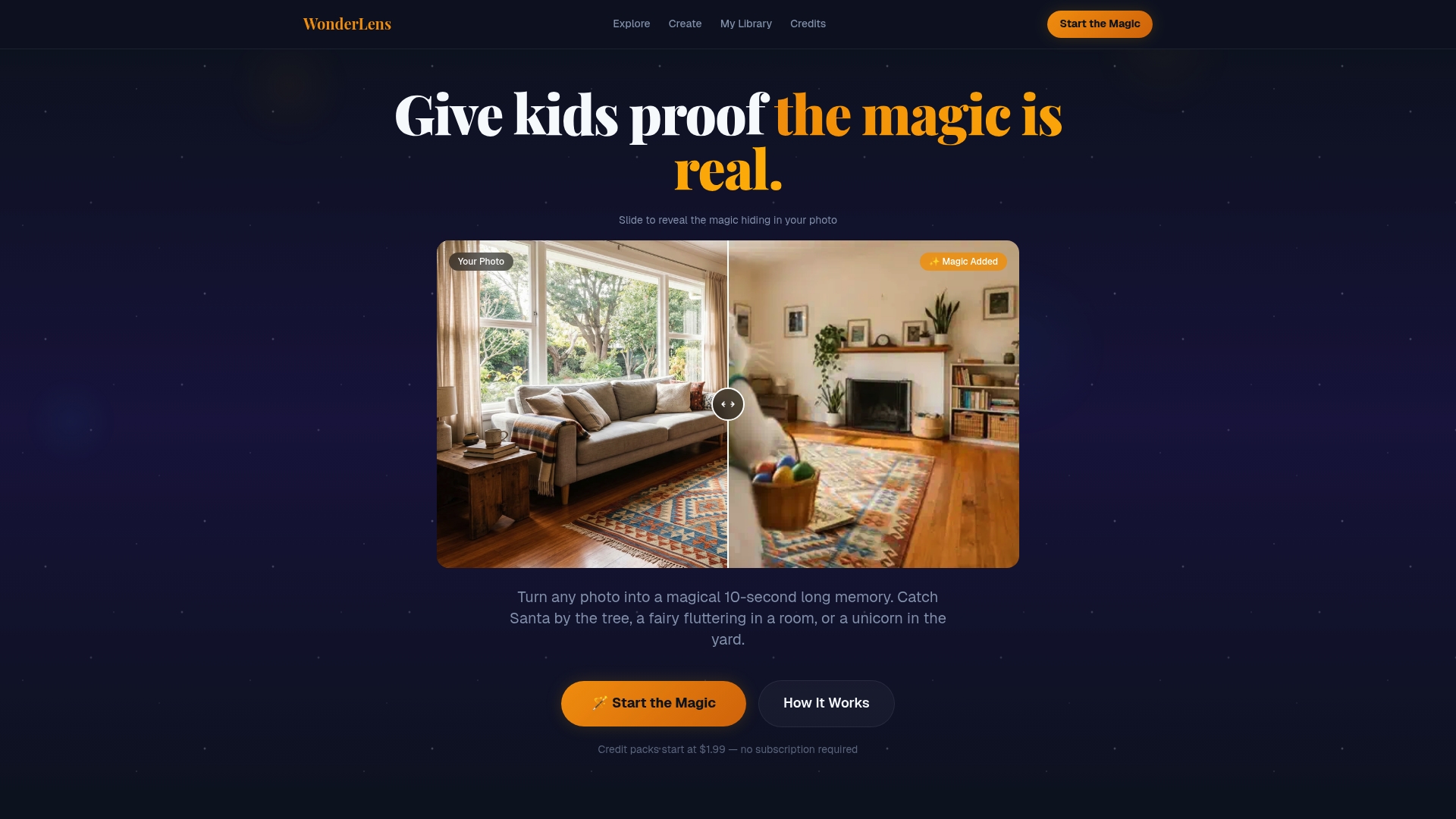
The AI rendering matches real lighting and shadows in your home, so the result looks genuinely magical rather than like a basic filter. Credits start at $1.99 per video, making it an affordable addition to any family's holiday memory traditions. Wonderlens works on any device, requires no editing skills, and produces a shareable video your kids will ask to watch again and again. Add it to your seasonal memory workflow as the moment that anchors every holiday. Visit Wonderlens to create your first magical family memory today.
FAQ
What is a memory-making workflow for families?
A memory-making workflow for families is a repeatable system for capturing, organizing, and preserving meaningful moments through rituals, photo management, and creative documentation. It replaces scattered, reactive memory keeping with an intentional, consistent process.
How often should families work on memory organization?
Short weekly sessions of 15–30 minutes work better than infrequent marathon efforts. Recurring micro-tasks prevent photo backlogs and keep the system manageable for busy families.
What are the best rituals for creating family memories?
Weekly rituals like pancake mornings, monthly outings, kid-led activity choices, and scheduled no-phone moments form the strongest foundation. A parenting expert found that just four seasonal anchors can generate a full season of core memories.
How do you preserve family memories digitally without losing them?
Use a cloud service like Google Photos or iCloud for automatic backup, organize photos by event rather than date, and add captions within 48 hours of capturing them. Monthly sorting sessions prevent the backlog that causes most families to give up.
Do unplanned moments really make better memories than planned ones?
Research shows that unplanned, chaotic moments often form stronger memories than staged events. Shared problem-solving and surprise anchor memories more deeply, so document the messy moments alongside the picture-perfect ones.
Recommended
- Creating Personalized Family Memories That Truly Last — WonderLens | WonderLens
- Your Guide to Magical Family Memories That Last — WonderLens | WonderLens
- Create Cinematic Digital Memories for Kids: A Parent's Guide — WonderLens | WonderLens
- How to Create Digital Keepsakes Your Family Will Treasure. WonderLens | WonderLens