What Is AI Visual Effects? Your 2026 Creative Guide
June 28, 2026
AI visual effects are computer-generated imagery created, automated, or enhanced by artificial intelligence algorithms to produce realistic and complex visuals faster than traditional methods allow. The industry term is "AI VFX," and it covers everything from automated rotoscoping to generative scene creation. If you have ever wondered what is AI visual effects and why every filmmaker seems to be talking about it, the answer is simple: AI removes the most time-consuming technical barriers so creators can focus on storytelling. In 2026, AI in visual effects is not a future concept. It is the production standard.
How does AI transform traditional visual effects workflows?
AI transforms VFX workflows by automating the repetitive, frame-by-frame tasks that once consumed most of a production's time and budget. The role of AI in visual effects is most visible in four core areas: rotoscoping, keying, motion tracking, and texture generation. Each of these tasks previously required skilled artists working for days or weeks on a single shot.
Automated rotoscoping cuts production time by 60–80%. That single change reduces staffing needs for automatable tasks by a similar margin, freeing artists for work that actually requires human judgment.
AI also reshapes the three stages of production:
- Pre-production: AI pre-visualization tools generate rough concept versions in hours instead of weeks. Locking creative decisions earlier avoids costly changes during principal photography.
- Production: Real-time AI tracking and compositing tools let directors see effects on set, reducing guesswork in post.
- Post-production: AI handles color matching, noise reduction, and background replacement at speeds no manual workflow can match.
Pro Tip: Use AI pre-visualization to test three or four scene compositions before committing to a single camera setup. The time you spend in pre-vis pays back tenfold when you avoid a reshoot.
The result is a pipeline where artists spend their hours on creative craft rather than technical cleanup. That shift changes what a small team can produce.
What creative opportunities does AI enable in visual storytelling?
AI does not replace the artist. It removes the creative blockers that slow artists down. The role of AI in visual storytelling is best understood as a collaborator that handles execution so the human can focus on intent.
The creative opportunities AI unlocks include:
- Concept art generation: AI models produce multiple lighting setups, color palettes, and mood boards in minutes, giving directors real visual options to react to.
- Atmospheric effects: Generative models create fog, rain, fire, and volumetric light that would take compositing teams days to build manually.
- Digital doubles: AI generates photorealistic character replicas for dangerous stunts or scenes requiring multiple versions of the same actor.
- Emotional framing: AI tools analyze scene composition and suggest framing adjustments that reinforce the emotional beat of a moment.
"AI empowers creators to produce more with less, expanding creative scope across roles." — Behind the Lens, NYU Tisch
The risk in AI visual effects is passivity. Artists who accept the first AI output without directing it produce what the industry now calls "AI slop." Generic textures, flat lighting, and incoherent motion are the telltale signs. Actively directing AI outputs and maintaining high creative standards separates professional AI VFX from amateur results. The tool is only as good as the creative vision guiding it.
The most exciting shift is speed of iteration. Multiple quick concept versions let a director explore ideas that would have been too expensive to test before. That freedom changes how stories get told.
What are the best techniques for high-quality AI visual effects?
Producing high-quality AI VFX requires more than pressing a button. The difference between polished results and obvious AI artifacts comes down to workflow discipline. These are the techniques that separate professional outputs from generic ones.
- Define your start and end frames. Anchoring generative clips with clear start and end frames gives the AI a consistent visual boundary. Without this, motion and lighting drift between frames.
- Use multi-step workflows. Generate a base element first, verify identity and lighting consistency, then add motion. Skipping steps produces incoherent results.
- Apply the 80/20 approach. The 80/20 method uses AI for repetitive tasks like keying and color matching (the 80%) and reserves human artistry for emotional and compositional refinement (the 20%). This keeps quality high without wasting skilled labor on automatable work.
- Verify before you composite. Check every AI-generated element for edge artifacts, lighting mismatches, and motion inconsistencies before placing it in the final composite.
- Maintain the "anti-slop" standard. The anti-slop movement in professional VFX emphasizes invisible AI use. The goal is craft enhancement, not overt AI aesthetics.
Pro Tip: When generating atmospheric effects like fog or fire, render them at twice the resolution you need. Scaling down hides compression artifacts that AI generators often introduce at native resolution.
Where does human expertise remain non-negotiable? Emotional performance, nuanced lighting on faces, and final color grading still require a skilled human eye. AI handles the scaffolding. The artist builds the soul of the shot.
| Task | Best handled by |
|---|---|
| Rotoscoping and keying | AI automation |
| Motion tracking | AI automation |
| Facial lighting and emotion | Human artist |
| Final color grade | Human artist |
| Atmospheric generation | AI with human direction |
How does AI visual effects impact production costs in 2026?
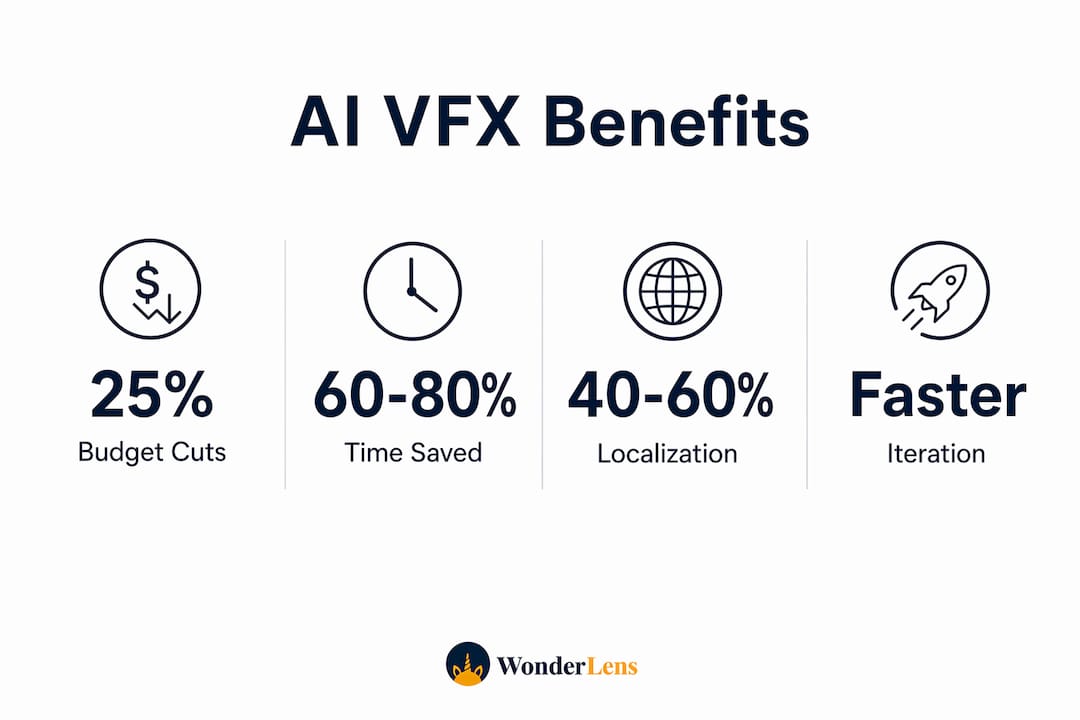
The economic impact of AI in visual effects is measurable and significant. AI integration reduces total VFX budgets by 10–25% across mid-sized productions. That is not a marginal saving. On a $2 million VFX budget, a 20% reduction frees $400,000 for other creative priorities.
Content localization shows the sharpest savings. AI lip-syncing and dubbing tools cut localization costs by 40–60%. A film that once required weeks of ADR and manual lip-sync work for international releases now completes that process in days.
| Cost area | AI impact |
|---|---|
| Total VFX budget | 10–25% reduction |
| Rotoscoping labor | 60–80% time reduction |
| Dubbing and localization | 40–60% cost reduction |
| Pre-visualization | Faster iteration, earlier creative lock |
Smaller teams now produce work that previously required large studios. A two-person team with access to current AI VFX tools can deliver effects that would have required a department of ten just five years ago. That shift lowers the barrier to entry for independent filmmakers and opens the door for more diverse creative voices.
Early creative locking through AI pre-visualization also avoids the most expensive kind of cost: changes made late in production. When a director can see and approve a shot concept in pre-vis, the chance of a costly reshoot drops sharply.
Key Takeaways
AI visual effects combine automation and human artistry to produce cinematic results faster, cheaper, and at a higher creative scale than traditional VFX workflows alone.
| Point | Details |
|---|---|
| AI automates repetitive VFX tasks | Rotoscoping and keying see 60–80% time savings, freeing artists for creative work. |
| Budget reductions are real | AI integration cuts total VFX budgets by 10–25% and localization costs by up to 60%. |
| Human direction is non-negotiable | Artists must actively direct AI outputs to avoid generic results and maintain quality. |
| Multi-step workflows improve consistency | Defining start and end frames and verifying each element prevents artifacts and drift. |
| AI expands creative scope | Faster iteration lets creators test more ideas, improving storytelling decisions before production locks. |
Why I think AI VFX is the best creative news in a decade
I have watched a lot of creative tools come and go with promises they could not keep. AI visual effects are different, and not because of the technology itself. They are different because of what they give back to the artist: time and permission to experiment.
The misconception that AI replaces creatives is the most damaging idea in the current conversation. Every artist I respect uses AI the way a carpenter uses a nail gun. It does not replace the craft. It removes the part that was never the craft to begin with.
What I find most underrated is the pre-visualization shift. The ability to lock creative decisions earlier does not just save money. It gives directors the confidence to commit to a vision before the pressure of a live set. That confidence shows up on screen.
My honest advice: stop thinking about AI as something that happens to your work. Start treating it as a tool you direct. The artists producing the best results in 2026 are not the ones with the most AI tools. They are the ones who know exactly when to use them and when to put them down.
— Jeremiha
Wonderlens and the magic of AI visual effects at home
AI visual effects are not just for Hollywood productions. Wonderlens brings the same principles of realistic lighting, shadow casting, and motion rendering into your living room.

With Wonderlens, you upload a photo of your home and the platform places animated fantasy characters, from Santa to unicorns to dragons, directly into your space. The AI matches the lighting and shadows of your actual room so the character looks like it truly belongs there. These magical AI-powered videos start at $1.99 per video and take seconds to create. You get a shareable, cinematic memory your kids will talk about for years. Wonderlens makes the same AI visual effects techniques used in film production accessible to every family, with no editing skills required.
FAQ
What is AI visual effects in simple terms?
AI visual effects are images or animations created or enhanced by artificial intelligence to make videos look more realistic or magical. AI automates tasks like background removal, motion tracking, and character animation that once required large production teams.
How does AI affect visual effects quality?
AI improves quality by handling technical tasks with greater consistency than manual methods. Artists then spend their time on the creative decisions that actually shape how a shot looks and feels.
What are the main benefits of AI visual effects?
The main benefits are speed, cost savings, and creative freedom. AI cuts rotoscoping time by 60–80% and reduces total VFX budgets by 10–25%, while giving creators more time to focus on storytelling.
Can beginners use AI visual effects tools?
Yes. Platforms like Wonderlens are built for people with no technical background. You upload a photo, choose a character, and the AI handles all the realistic visual effects work automatically.
What is the future of visual effects with AI?
AI will continue to reduce production costs and expand what small teams can create. The focus is shifting toward invisible AI use, where the technology enhances craft without leaving obvious digital fingerprints on the final image.
Recommended
- Types of AI Photo Effects: 2026 Creative Guide. WonderLens | WonderLens
- The Role of AI in Digital Keepsakes Explained. WonderLens | WonderLens
- AI-powered photo animation: create magical family memories — WonderLens | WonderLens
- What Is Visual Realism in AI Videos for Filmmakers. WonderLens | WonderLens