Easter Surprise Animation Apps for Parents: Make Magic Fast
August 1, 2026
The fastest way to create a magical Easter surprise for your child is a 10–15 second personalized animation clip made in minutes using a browser-based AI tool. No downloads, no design skills, no stress. Wonderlens places a lifelike Easter Bunny directly inside a photo of your living room, garden, or hallway, with correct shadows and lighting so it genuinely looks like the bunny was there.
Here's what makes this approach work so well for young kids:
- Clip length: 10–15 seconds is the standard for maintaining attention in preschoolers and toddlers, and it's the perfect length for a surprise reveal.
- First video free: Wonderlens offers a free demo clip so you can see the magic before spending anything.
- Credits from $1.99: After the free video, single-download credits start at $1.99, no subscription required.
- Works everywhere: Mobile browser, desktop browser, no large app install needed.
Pro Tip: Film or photograph the exact spot where your child opens Easter gifts. Using that familiar corner as the background makes the bunny's visit feel completely real to little ones.
Table of Contents
- How do you create a personalized Easter surprise animation?
- What should you expect from Easter surprise animation apps?
- Why is Wonderlens a top pick for Easter surprise animations?
- What Easter animation ideas work best for toddlers and preschoolers?
- What's the privacy checklist for using kids' photos in animation apps?
- Key Takeaways
- Why a short, personalized clip works better than you think
- Your first Easter surprise clip with Wonderlens is free
- Useful sources and further reading
How do you create a personalized Easter surprise animation?
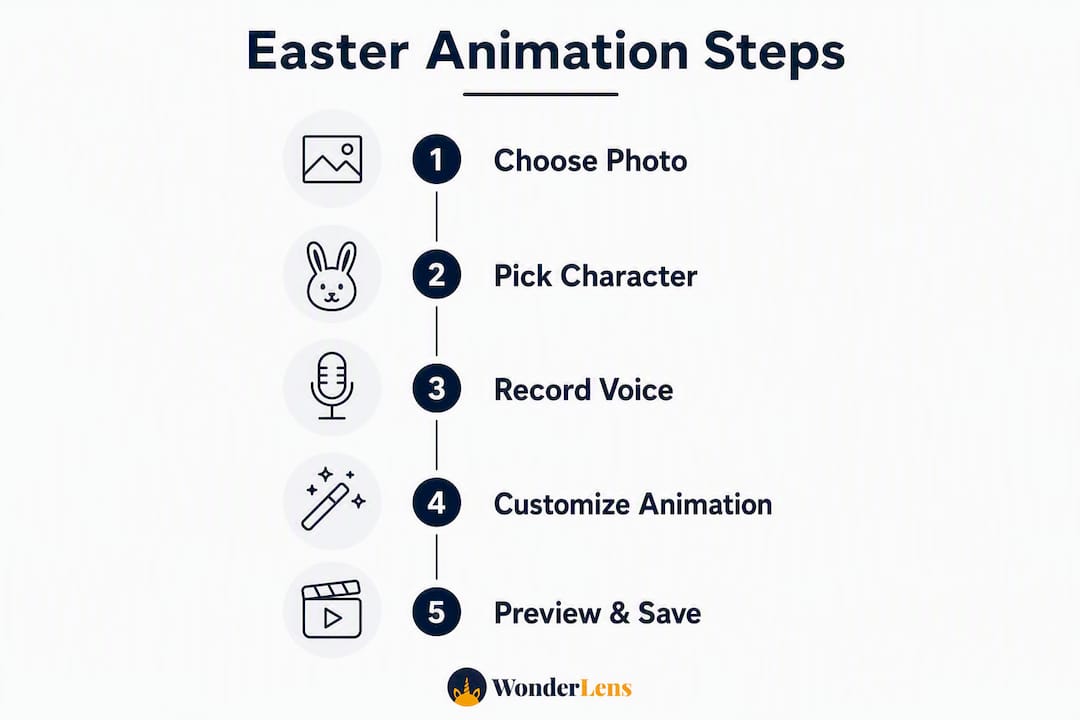
Modern AI tools handle the technical heavy lifting automatically, so the whole process from idea to download takes well under 15 minutes. Here's the four-step workflow:
-
Choose your template or scene. Pick a character and setting that fits your child's age and your home. A living-room scene works for toddlers; a garden pop-out or mailbox reveal tends to delight slightly older kids. Wonderlens offers Easter Bunny characters alongside fairies, unicorns, and more.
-
Upload one clear photo. Snap or select a photo of the room or outdoor spot where the surprise will happen. The AI analyzes the lighting and shadows in that image so the character blends in naturally rather than floating on top like a sticker.
-
Customize the animation. Type a short greeting (the child's name plus one line works best), choose the character's action (a hop, a wave, a nose twitch), and add any finishing touches. Keep the message short and emotionally focused.
-
Generate, preview, and download. Cloud rendering typically completes in a few minutes. Preview the clip, and if the lighting or motion needs a small tweak, re-render before downloading your finished 10–15 second surprise clip.
Pro Tip: Record your own voice for the greeting instead of using text-to-speech. Hearing a familiar voice alongside the animated character makes the moment feel even more personal.
What should you expect from Easter surprise animation apps?
The best Easter-themed animation tools share a few core features worth knowing before you commit to one.
Features to look for:
- A template library with holiday characters and scene backgrounds
- Automatic lighting and shadow integration so characters look placed, not pasted
- Text-to-speech voiceover or the option to upload your own voice recording
- Export options in both vertical (for phone sharing) and horizontal formats
- Short, watermark-free clip downloads ready for social or private sharing
Pricing models follow a consistent pattern across the category. Most tools offer a free starter demo or template preview, then shift to credit-based pricing for download-ready clips. You buy credits in small packs and spend one credit per video, so there's no subscription locking you in. Wonderlens follows this model exactly: first video free, then credits starting at $1.99.
Time expectations are genuinely fast. Planning and uploading your photo takes roughly 5–10 minutes. Customizing the animation adds another 2–10 minutes depending on how much you personalize. Cloud rendering for a short clip typically finishes in a few minutes, putting your total production-to-download time well under 15 minutes for most families.

Why is Wonderlens a top pick for Easter surprise animations?
Wonderlens stands out because it was built specifically for this kind of moment: a short, realistic, emotionally resonant clip that places a beloved character inside your home.
| Feature | What Wonderlens delivers |
|---|---|
| Realism | Correct lighting, shadow casting, and motion integration |
| Clip length | Short outputs designed for surprise reveals |
| Pricing | First video free; credits from $1.99, no subscription |
| Platform | Browser-based on mobile and desktop, no large install |
| Characters | Easter Bunny, Santa, fairies, unicorns, dragons, and more |
| Safety | Family-friendly positioning with safe image handling |
The realistic lighting and shadow work is what separates Wonderlens from basic AR filters. When the Easter Bunny hops across your couch and catches the same afternoon light as your furniture, young children believe it. That's the whole point.
Wonderlens step-by-step:
- Visit wonderlens.ai and select the Easter Bunny character.
- Upload a photo of your chosen room or outdoor spot.
- Type a short greeting or record your voice.
- Generate the clip, preview it, and download your free demo video.
Pro Tip: Choose a background with a clear focal point, like a fireplace, a garden gate, or a specific armchair. The bunny's entrance lands harder when there's one obvious spot for the child to look.
What Easter animation ideas work best for toddlers and preschoolers?
Simple, high-contrast visual reveals outperform complex scenes every time with young children. A bunny ear wiggling from behind the couch beats a full narrative every time. Here are the archetypes that consistently delight:
- Doorbell surprise: The bunny appears at your front door, waves, and hops away.
- Garden pop-out: A giant egg wobbles, cracks, and the bunny emerges from a bush.
- Lost-and-found: The bunny returns a toy or stuffed animal to a recognizable shelf.
- Direct address: The bunny says the child's name and leaves a clue for the egg hunt.
Short script templates by age:
- Ages 2–5: "Hi [Name]! I hid something special for you. Can you find it?" (6 seconds of action, 4 seconds of hop-away.)
- Ages 6–8: "Happy Easter, [Name]! I left three golden eggs. The first one is somewhere cozy..." (Builds anticipation for a hunt.)
"A simple message, a recognizable background, and a clear visual payoff outperform high-complexity scenes for young children." — Easter Story Videos Kids Love
For export, keep the master clip at 10–15 seconds. Render a vertical version for phone sharing in family group chats and a horizontal version for playing on a TV during the Easter morning reveal.
Pro Tip: For kids under three, skip the voice line entirely and let the visual action carry the moment. A bunny twitching its nose and waving is all the magic they need.
What's the privacy checklist for using kids' photos in animation apps?
Basic privacy hygiene matters whenever you upload family photos to a cloud-based tool. Follow these steps before you generate and share:
- Crop tightly. Upload only the room or background area you need. Crop out other family members, school uniforms, or anything that identifies your address.
- Check data retention. After downloading your clip, delete the source photo from the app's project folder if you don't plan to reuse it. Review the platform's data retention policy before uploading.
- Get consent before sharing. If you plan to post the video anywhere beyond your immediate family, get agreement from all guardians shown or named in the clip.
- Prefer private links. Send the finished video via direct message or a private share link rather than a public social post, at least until your child is old enough to weigh in on sharing their own image.
- Avoid full names in captions. When sharing, use a first name only, and never include school names, locations, or other identifying details in the caption.
Pro Tip: Most browser-based tools process your photo in the cloud and don't store it permanently. Still, read the privacy policy once before you upload, especially for a child's photo. It takes two minutes and removes any guesswork.
Safety note: Wonderlens is positioned as a family-friendly platform with safe image handling, but as with any cloud tool, reviewing the current privacy policy before uploading children's photos is always the right call.
Key Takeaways
The single most effective Easter surprise is a short personalized animation clip placed in a recognizable home setting, made in minutes with a browser-based tool like Wonderlens.
| Point | Details |
|---|---|
| Ideal clip length | 10–15 seconds holds preschool attention and delivers a clean surprise payoff. |
| Simplicity wins | One-line greeting plus one visual action outperforms complex, dialogue-heavy scenes for young kids. |
| Plan your logistics | Choose a recognizable background photo, confirm browser compatibility, and budget one or two credits. |
| Pricing is low-commitment | First video is free; additional credits start at $1.99 with no subscription required. |
| Wonderlens recommendation | Wonderlens delivers realistic lighting, shadow integration, and a browser-based workflow for Easter surprise clips. |
Why a short, personalized clip works better than you think
The instinct most parents have is to make the video impressive. More detail, more dialogue, longer runtime. That instinct is worth resisting.
What actually creates wonder in a four-year-old isn't photorealistic fur texture or a two-minute story arc. It's the bunny standing next to their couch. The character casting a shadow on their rug. The familiar corner of the living room suddenly alive with spring magic. Placement and familiarity do more emotional work than any production value upgrade.
There's also a practical attention argument. Toddlers and preschoolers respond to immediate visual payoffs. A 10-second clip with one clear action, a hop or a wave or a nose twitch, can be replayed a dozen times in a row and still get a gasp. A longer, more complex video gets watched once and forgotten. Short isn't a limitation. It's the format.
The credit-based model matters here too. Parents don't need a subscription to create one magical Easter morning. A single credit, a single clip, a single moment. That's the whole transaction. No ongoing commitment, no annual fee, no pressure to keep creating content to justify a plan. Just one perfectly timed surprise.
Your first Easter surprise clip with Wonderlens is free
Wonderlens gives you a free first video, so you can see exactly what the finished clip looks like before spending anything. The Easter Bunny hops through your actual living room, twitching its nose and spreading spring magic, with lighting and shadows that match your space.

Getting started takes about five minutes. Visit Wonderlens, pick the Easter Bunny character, upload a photo of your chosen room, type a short greeting or record your voice, and generate your free demo clip. If you love it, download it. If you want a second version with a different scene or character, credits start at $1.99 per video, no subscription, no lock-in.
For a deeper look at animated memories workflow from photo to download, Wonderlens has a full step-by-step guide on its site. The whole process, from opening the browser to sharing the clip with your family, fits comfortably inside an Easter morning.
Useful sources and further reading
A few resources worth bookmarking as you plan your Easter surprise:
- Create memorable Easter animations: a step-by-step guide for parents — Wonderlens's own detailed how-to for parents building their first clip.
- Holiday animation for parents: a creative family guide — Practical creative guidance and scene ideas you can adapt for Easter.
- Examples of animated holiday keepsakes for families — A gallery of finished clips for inspiration before you start.
- Why animated holiday surprises matter: the parent's guide to magical moments — The case for building surprise animation into your family's holiday traditions.
- Screen-free activities for kids: 12 ideas that work — A helpful companion resource for balancing the digital surprise with hands-on Easter fun.
Recommended
- Create memorable Easter animations: a step-by-step guide for parents — WonderLens | WonderLens
- How Easter animations create magical memories for families — WonderLens | WonderLens
- How to make Easter fantasy videos for magical memories — WonderLens | WonderLens
- Why animated Easter videos boost family engagement — WonderLens | WonderLens