Magical Video Effects for Families: Your Complete Guide
August 3, 2026

The fastest way to create a magical video effect for your family is a short AI-rendered clip that places a fantasy or holiday character directly into a real photo of your home. No editing skills needed. No software to download. Just one clear photo, a short mood prompt, and a browser-based platform like Wonderlens to bring the magic to life.
Here's what you supply and what you get back:
- One clear photo of your child, family group, or home space
- A short text prompt describing the mood, motion, or character behavior you want
- Optional context such as room location or time of day for better lighting matching
- Output: a downloadable 10-second animated loop, ready to share privately or archive as a keepsake
Processing typically runs a few minutes from upload to download. Credits start from a low cost, and your first video is free. Every template is built with family-safe defaults, so there's nothing to configure before you begin.
Pro Tip: Write your mood prompt before you upload the photo. Something like "Santa peers around the doorway with warm fireplace glow" takes 10 seconds to type and gives the AI a precise visual target.
Table of Contents
- How do you make a 10-second magical family video, step by step?
- What makes a photo produce realistic-looking magic?
- What occasions are these short clips perfect for?
- How long does it take, and what does it cost?
- How do you keep kids' photos private while still sharing the magic?
- Why does Wonderlens produce such realistic results?
- Ready-to-use micro-scripts and storyboard templates
- How do you save and organize your family video archive?
- Key Takeaways
- Why short magical videos matter more than you might think
- Wonderlens makes your first magical video free
- Useful sources and further reading
How do you make a 10-second magical family video, step by step?
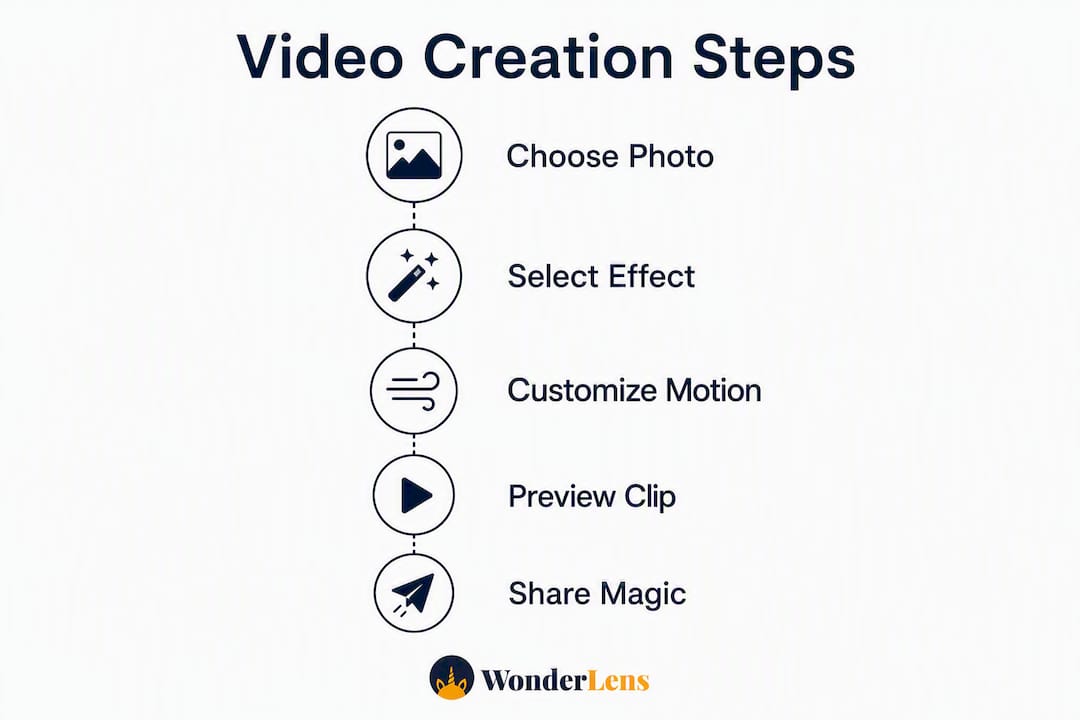
The whole workflow fits inside a single browser tab and takes most parents under 10 minutes from start to finish. Follow the step-by-step guide on the Wonderlens blog for a detailed walkthrough, or use this quick sequence:
- Choose your photo. Pick one with a clear face, good natural light, and a simple background. Close-ups work best for single-child effects; group shots work well for holiday scenes.
- Select your character and effect. Santa, unicorn, fairy, dragon, Easter Bunny, superhero — pick the one that fits the occasion and your child's current obsession.
- Upload and write your prompt. Keep it specific and restrained. Prompts describing subtle breathing, a slight head turn, or soft blinking produce far more realistic motion than vague instructions like "make it magical."
- Preview before you render. Check character placement, lighting blend, and motion intensity. Adjust scale or mood if anything looks off.
- Render and download. Save the final MP4, name it with a consistent pattern (more on that in the archive section), and share via private link or direct message.
Before you hit render, confirm:
- Photo is in focus and at least 1080p resolution
- Character placement looks natural relative to the room's light source
- Motion prompt is specific (avoid single-word prompts like "dance")
- You have a copy of the original photo saved separately
Pro Tip: Try the free demo first. Wonderlens lets you preview before spending any credits, so you can confirm the style and motion feel right before committing.
What makes a photo produce realistic-looking magic?
The realism of your finished clip depends almost entirely on the photo you start with. Face-focused inputs that preserve likeness and deliver organic motion are what separate a convincing magical moment from a jarring overlay.
- Match the lighting direction. If your photo was taken near a warm lamp, choose a character effect with a matching golden glow. A character lit from the wrong angle breaks the illusion immediately.
- Prefer three-quarter angles and natural smiles. Straight-on passport-style shots produce stiffer motion. A slight turn gives the AI more depth information to work with.
- Keep backgrounds simple. Busy wallpaper, heavy shadows, or extreme backlighting make character integration harder. A plain wall or a softly lit living room corner works beautifully.
- Shoot or crop for subject clarity. The subject should fill roughly a third of the frame. Too small, and facial motion fidelity drops noticeably.
- Remove distractions before uploading. A quick crop to eliminate a cluttered countertop or a bright window behind the subject takes 30 seconds and meaningfully improves the result.
Pro Tip: Golden-hour photos taken near a window between 4–6 PM give characters a warm, cinematic glow that matches almost any holiday character effect Wonderlens offers.
What occasions are these short clips perfect for?
Families who build a habit of creating short animated clips end up with something genuinely precious: a growing archive of moments that gain emotional resonance every time they're replayed. Here are the occasions that work best, and why.
Recurring celebrations:
- Birthday mornings: Your child wakes up to a fairy cheering with animated confetti, placed right in their bedroom doorway
- Holiday surprises: Santa peers around the living room fireplace on Christmas Eve, catching the same warm light as the room itself
- Easter weekend: The Easter Bunny hops across your actual backyard, twitching its nose near the basket spot
- First day of school: A superhero stands beside your child in their new outfit, cape catching a breeze
Keepsakes that travel:
- Long-distance grandparent gifts: A 10-second clip of the grandkids with an animated character lands better than a photo gallery. Grandparents watch a short video repeatedly rather than scroll through 40 photos.
- Family group chat moments: Silly dragon or unicorn clips for costume parties, dance challenges, or birthday invitations
- Monthly ritual clips: First haircut, first lost tooth, yearly height-check portrait — each one gets a character overlay and joins the archive
How long does it take, and what does it cost?
Speed and pricing are two of the most common questions parents ask before trying a new creative tool. Here's what to expect.
- Upload to preview: typically 2–3 minutes for a standard portrait photo
- Final render: usually under 5 minutes total for a single animated clip 2–10 seconds in length, though server load can add a minute or two during peak times
- Pricing model: credit-based, with no subscription required. Credits start from a low cost, and your first video is free — so there's no financial risk to trying it
- What affects cost: higher-resolution output passes, multiple customization rounds, or compositing several photos into a montage will use more credits than a single standard render
- Best practice: always use the free preview to confirm style and motion before spending credits on the final render
How do you keep kids' photos private while still sharing the magic?
Sharing a magical clip of your child with extended family feels wonderful. Doing it carelessly carries real risks. A few simple habits keep the joy intact without exposing your family's images publicly.
- Default to private sharing. Send clips via direct message or private family album links rather than posting to public social media accounts
- Get consent before sharing other families' children. If a clip features a friend's kid at a birthday party, confirm with their parents before forwarding
- Delete temporary uploads when possible. If the platform allows it, remove source photos from the server after your clip is generated and downloaded
- Use stylized effects for very young children. Cartoon or illustrated character styles feel age-appropriate and reduce the uncanny-valley effect that can sometimes unsettle toddlers
- Share preview versions first. Send a watermarked or lower-resolution version to extended family before distributing the full-quality file widely
Pro Tip: Pin the final clip in your private family group chat rather than a public story. It stays accessible to the people who matter and invisible to everyone else.
Why does Wonderlens produce such realistic results?
Most photo-overlay apps drop a flat character sticker onto your image. Wonderlens works differently. The platform uses AI-driven visual rendering to analyze depth, estimate the room's light direction, and place characters so they cast believable shadows and catch the same ambient glow as everything else in the scene.
Here's what happens under the hood:
- Image analysis: the AI reads depth cues, surface textures, and light source direction from your photo
- Character placement: the fantasy figure is positioned at a scale and angle consistent with the room's geometry
- Lighting and shadow synthesis: the character catches the same light as your furniture and family members, including soft edge shadows
- Motion tuning: subtle breathing, blinking, and gentle movement are calibrated for faces and household scenes, not generic animation loops
Family-safe templates, adjustable motion intensity, and character scale controls mean you stay in charge of the final feel. The Wonderlens blog carries step-by-step guides for every character type, and the free demo lets you see the rendering quality before you spend a single credit.
Ready-to-use micro-scripts and storyboard templates
Writing a good prompt from scratch takes practice. These plug-and-play templates give you a starting point for the three most popular clip types. For more style examples, browse animated family memory styles.
Template 1: Birthday surprise
- Shot 1: Character appears behind the birthday child, arms raised
- Shot 2: Character reacts with delight, confetti falls
- Shot 3: Loop back to celebratory pose
Micro-script prompt: "A cheerful fairy hovers behind [child's name], wings fluttering softly, scattering golden confetti with a warm smile."
Template 2: Holiday morning
Single photo, warm fireplace light, Santa peeking around the doorframe.
Prompt: "Santa peeks around the living room doorway, eyes twinkling, breath visible in the cold air, bathed in soft orange fireplace glow."
Template 3: Long-distance keepsake
Face close-up, subtle breathing motion, personalized voice line.
Prompt: "Child smiles gently, eyes bright, a tiny fairy perched on their shoulder whispering — 'Hi Grandma!' — with soft indoor afternoon light."
Choosing the right template:
- Candid photo with natural expression? Use Template 1 or 3 for organic motion.
- Posed group shot near a fireplace or window? Template 2 handles composed scenes best.
- Outdoor photo with natural light? Any template works; match the character's lighting to the sky tone.
How do you save and organize your family video archive?
A single magical clip is a lovely surprise. Thirty of them, organized by year, become something your kids will watch with their own children someday. Building a growing archive around annual rituals compounds the emotional value in a way no single video can.
File and folder setup:
- Save every clip as a 1080p MP4 with a consistent filename:
childname_event_year.mp4(e.g.,maya_christmas_2026.mp4) - Organize folders by milestone category: Birthdays, Holidays, Firsts, Silly Moments
- Keep a simple metadata text file in each folder: date, location, character used, and the prompt you wrote
Backup and sharing:
- Save one local copy on an external drive or computer
- Back up to a cloud service (Google Photos, iCloud, or Amazon Photos all support MP4)
- Pin the year's best clip in your private family group chat as a "watch party" anchor
- Share a private album link with grandparents at the end of each year
Archive checklist per clip:
- Raw source photo (original, unedited)
- Final rendered MP4
- Prompt text used
- Date and occasion note
Key Takeaways
Personalized 10-second animated clips created from a single family photo are the fastest, most emotionally resonant way to build magical keepsakes that families replay for years.
| Point | Details |
|---|---|
| Keep clips short and focused | Animated loops 2–10 seconds get rewatched the most; longer clips lose the magic quickly. |
| Photo quality drives realism | Clear faces, good lighting, and simple backgrounds produce the most believable character integration. |
| Use previews before spending credits | Test motion and style with the free demo; credits start from $1.99 for final renders. |
| Archive annually for lasting value | Organized milestone folders build emotional resonance that grows stronger every year. |
| Wonderlens is the recommended starting point | Browser-based, no download needed, first video free, with realistic lighting and shadow rendering built in. |
Why short magical videos matter more than you might think
The conventional wisdom says a great family photo is enough. A framed print, a shared album, a holiday card. But there's a gap between what a still image captures and what a child actually experiences when they see a unicorn standing in their living room, breathing softly, catching the afternoon light.
Short animated keepsakes work because they carry presence. A 10-second clip of Santa peeking around your doorway on Christmas morning isn't just a decoration. It's a memory your child will describe to their own kids. The magic isn't in the character. It's in the fact that it happened in your home, with your light, in your space.
What most parents underestimate is the archive effect. One clip is a surprise. Ten clips, organized by year, become a ritual. By the time your child is twelve, you'll have a private library of moments that no photo album can replicate. The emotional value doesn't just hold. It compounds.
The tools to do this well exist right now, they're affordable, and the learning curve is genuinely flat. The only thing that doesn't scale is time. These moments are happening whether you capture them magically or not.
Wonderlens makes your first magical video free
Your next step is simple: pick one photo, choose a character, and see the magic render in your browser. No software to install, no subscription to sign up for.

Wonderlens gives you cinematic lighting, believable shadows, and lifelike character motion from a single family photo. The first video is free, and additional credits start from $1.99 per clip. Everything runs in your browser, so you can be watching your child's reaction in under 5 minutes.
Quick-start checklist:
- Choose a clear, well-lit photo with a simple background
- Pick your character (Santa, unicorn, fairy, dragon, and more)
- Write a specific mood prompt (use the micro-scripts above)
- Preview the result before spending any credits
- Render, download, and share privately with family
Start your first free magical video on Wonderlens and see exactly what your living room looks like with a little wonder in it.
Useful sources and further reading
- Step-by-Step Magical Video Guide for Families — Wonderlens
- Tips for Personalized Holiday Videos Families Will Love — Wonderlens
- How to Create Magical Videos Kids Will Truly Love — Wonderlens
- Examples of Animated Family Memories for Every Style — Wonderlens
- Creative Photo Animation Steps for Magical Family Memories — Wonderlens
- Animate Family Photos in Minutes with AI — Picasso IA Blog
Recommended
- Step by Step Magical Video Guide for Families. WonderLens | WonderLens
- How to create magical videos kids will truly love — WonderLens | WonderLens
- Cinematic Rendering for Families: Make Magical Home Videos. WonderLens | WonderLens
- Add animated characters to family photos: magical memories — WonderLens | WonderLens