Why Use AI for Family Surprises: Make Magic Moments
July 28, 2026
AI helps parents create deeply personalized, cinematic fantasy-character surprises for kids faster and with less skill than any traditional method. The result is a 10-second video of a dragon curling up in your living room, or Santa stepping through your front door, with lighting and shadows that match your actual space.
Here's why it works so well:
- Emotional bonding: Personalized narratives trigger oxytocin and strengthen family identity in ways generic gifts simply cannot.
- Speed: AI can produce rhyming clues, character animations, and personalized story elements in roughly 30 minutes versus hours of manual effort. In one case, the AI generated each rhyming clue in about 2 minutes, providing all seven clues and a treasure map in just 30 minutes, saving hours compared to manual brainstorming.
- Personalization at scale: You seed the AI with your child's name, favorite room, and inside jokes. The output feels made for them, because it was.
- Safe and repeatable: Platforms like Wonderlens are built with family-first privacy in mind, so you can create a new magical moment for every holiday.
Table of Contents
- Why use AI for family surprises? The psychology and creative case
- What you can create: best occasions and ideas for AI family surprises
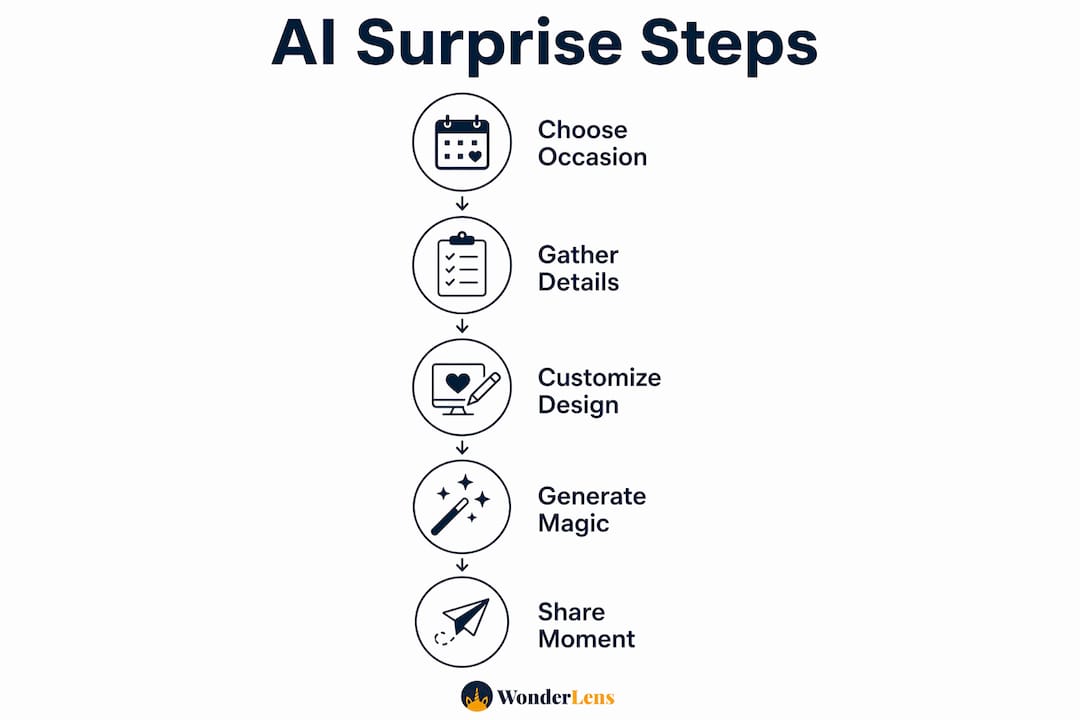
- How AI-generated fantasy character videos work, step by step
- Safety, privacy, and age-appropriate guidelines for children's AI content
- Tips to make AI surprises feel truly magical
- Cost, credits, and what to expect on delivery
- Key takeaways
- Why we believe in the magic of co-creation
- Your first magical video is one photo away
- Sources and further reading
Why use AI for family surprises? The psychology and creative case
The short answer: AI closes the gap between what you imagine and what you can actually make. Most parents have a vivid picture of the perfect surprise but lack the design skills or hours to pull it off. AI changes that equation.
Personalized AI content boosts bonding by triggering oxytocin through emotionally expressive narratives and shared memories. When a video references your child's nickname, their bedroom, and the stuffed animal on their pillow, the emotional hit is completely different from a generic holiday card.
AI also acts as a creative muse. According to AI World Journal, intentionally designed AI increases the frequency of genuinely useful surprises and works as a creative companion rather than a replacement for human imagination. You bring the love and the context; AI brings the cinematic execution.
Statistic spotlight: One AI-assisted family surprise project produced seven rhyming clues and a complete treasure map in about 30 minutes, with the AI generating each clue in around 2 minutes.
One honest trade-off: AI can occasionally produce small errors, wrong details, or mismatched facts. Human review before the big reveal is non-negotiable.
Pro Tip: Seed your prompts with hyper-specific family details: the exact name of your child's stuffed animal, the color of your living room couch, or a phrase only your family uses. Vague prompts produce generic results; specific ones produce magic.
What you can create: best occasions and ideas for AI family surprises
The occasions where AI-generated fantasy-character videos land hardest are the ones already charged with emotion.
High-impact occasions:
- Christmas morning (Santa stepping into your actual living room)
- Easter (the Easter Bunny hopping through your hallway, nose twitching)
- Birthdays (a dragon or unicorn appearing in the birthday child's bedroom)
- Milestone reveals: a new sibling, an adoption announcement, a surprise trip
- Bedtime story upgrades: a fairy landing on the windowsill
- "Just because" delights on an ordinary Tuesday
Creative formats to try:
- A 10-second cinematic character video placed in a photo of your home
- Personalized clue cards with rhyming riddles leading to a gift
- A short story animation featuring your child as the hero
- A character "message" video tied to a specific achievement
Psychology Today notes that AI makes emotionally rich gifts accessible without design skill, opening up formats like illustrated books and digital scrapbooks that used to require professional help.
The holy grail of AI gifting is 1:1 personalization: a surprise that reflects your child's unique personality, not a template anyone else could receive. For younger kids, keep it simple and short. For school-aged children, you can layer in more story detail and interactive clues. Teens often respond better to humor and inside references than to pure fantasy.
Pro Tip: Browse animated family memory styles before you start. Seeing finished examples helps you pick the right tone and character for your child's age and personality.
How AI-generated fantasy character videos work, step by step
The whole process, from photo to finished video, typically takes a short time depending on how much you personalize.
- Prepare your photo. Choose a well-lit, uncluttered room. Consistent light direction helps the AI match shadows and colors to the character.
- Pick your character and style. Santa, dragon, unicorn, fairy, Easter Bunny — choose the one that fits the occasion and your child's current obsession.
- Add personalization seeds. Enter your child's name, a detail about the room, and any inside joke or special phrase.
- Review and edit. Check the output for any hallucinations or odd details before anyone else sees it.
- Render and download. Wonderlens produces a 10-second cinematic clip you can save and share.
- Plan your reveal. Test the video privately first. Think about whether you'll play it on a phone, TV, or tablet for maximum impact.
High-quality, well-lit source photos significantly improve how realistic the character looks. The AI's ability to match lighting and shadows depends directly on your baseline photo. For a deeper look at the creative workflow, the photo animation steps guide walks through each stage in detail.
Pro Tip: Always preview the finished video alone before showing your child. Catching a small error privately is far better than a confused reaction mid-reveal.
Safety, privacy, and age-appropriate guidelines for children's AI content
Creating AI content with your child's photo and home environment calls for a few straightforward safeguards.
Safety checklist:
- Get verbal consent from older children and teens before using their image
- Share finished videos only through private channels (direct message, family group chat)
- Avoid entering unnecessary personal data beyond what the platform needs
- Use the platform's privacy controls and keep your account credentials secure
- Preview every output before showing it to younger children
COPPA awareness: Platforms serving children under 13 in the United States must comply with the Children's Online Privacy Protection Act, which limits data collection. Always review a platform's privacy policy before uploading photos of young children.
| Child's age | What to tell them | When to reveal the AI |
|---|---|---|
| Toddlers (1–3) | Nothing needed; pure wonder | Not applicable |
| Early childhood (4) | "A magical video just for you!" | After the moment, if they ask |
| School age (12) | "We made something special" | Soon after; curiosity is healthy |
| Teens (13+) | Involve them in creation | Before or during; co-create together |
If the video includes any identifying details about your home, consider whether you're comfortable with those details appearing in a shareable file. Keeping videos short (10 seconds is ideal) limits exposure while preserving the emotional punch.
Tips to make AI surprises feel truly magical
The difference between a video that makes a child gasp and one that just looks "pretty cool" usually comes down to a handful of specific choices.
Prompt tips:
- Name the exact room: "our living room with the blue couch and the Christmas tree in the corner"
- Include your child's nickname and a detail only your family would know
- Describe the mood you want: "warm and golden, like late afternoon sunlight"
- Specify the character's action: "the dragon is curling up next to the fireplace, looking sleepy"
Photo and lighting dos and don'ts:
- Do shoot in natural daylight or warm indoor light with one clear light source
- Do remove clutter that would break the illusion (piles of laundry, random toys)
- Don't use flash photography; it flattens shadows and makes character integration harder
- Don't over-explain the video to your child before they watch it
Pro Tip: Pair the AI video with one analog touch: a handwritten note "from" the character, or a small prop left nearby. The combination of digital magic and something physical makes the moment feel completely real.
Quick troubleshooting:
- Character looks pasted on: your source photo probably has mixed or harsh lighting. Reshoot in softer light.
- Odd shadows: the AI needs a consistent light direction. Move lamps to one side of the room.
- Character placement feels off: try a photo with more open floor space or a clear focal point.
- Output feels generic: go back and add three more specific family details to your prompt.
For more on what makes AI visual effects different from basic sticker overlays, the AI visual effects guide explains the rendering approach in plain language.
Cost, credits, and what to expect on delivery
Wonderlens uses a credit-based model: you buy credits in packs and spend them to generate individual videos. Your first video is free, so you can test the experience before spending anything.
- Starting price: Credits begin at $1.99, making a single magical video accessible without a subscription or long-term commitment.
- Turnaround: Most renders complete in seconds to a few minutes for a standard 10-second clip.
- Output: A downloadable 10-second cinematic video you can share directly from your phone or play on a TV.
- Budgeting tip: Use the free demo to test your photo quality and prompt before buying a credit pack. A well-lit photo and a specific prompt on the first try saves credits.
Pricing spotlight: Credits start at $1.99 and the first video is free. No subscription required. You pay only for what you create.
For holiday seasons when you want multiple characters across several occasions, credit packs offer better value than single purchases. Check the platform for current pack options.
Key takeaways
AI-generated fantasy character videos are the fastest way to create a deeply personal, cinematic family surprise that children remember long after the holiday ends.
| Point | Details |
|---|---|
| Personalization drives emotion | Seed prompts with specific names, rooms, and family details for the strongest emotional impact. |
| Photo quality matters | A well-lit, uncluttered photo helps AI match shadows and lighting for a believable result. |
| Always preview first | Check for hallucinations or odd details privately before showing the video to your child. |
| Add an analog touch | A handwritten note or small prop alongside the video makes the moment feel completely real. |
| Wonderlens starts at $1.99 | The first video is free; credit packs let you create magical moments for every occasion without a subscription. |
Why we believe in the magic of co-creation
The best family surprises have always been the ones where someone paid close attention. They noticed which character your child talks about at dinner, which room feels most like home, which inside joke makes everyone laugh. Wonderlens was built on that belief: that the most meaningful moments come from human intention combined with the right tools.
The platform's 10-second cinematic videos use realistic lighting and shadow rendering to place fantasy characters inside your actual home, not a generic backdrop. That specificity is what separates a video your child watches once from one they ask to see again and again. Research on artificial serendipity confirms that personal relevance and unexpectedness together are what make a surprise genuinely valuable. When you seed the AI with your family's real details, you get both.
Co-creation, where human context meets AI rendering, produces better emotional outcomes than any fully automated approach. You bring the love. Wonderlens brings the magic.
Your first magical video is one photo away
The hardest part of creating an AI family surprise is usually just starting. Wonderlens makes that first step easy: grab one good photo of your child's favorite room, think of their name and one detail only your family would know, and you're ready.

The dragon character page is a great first choice — a friendly dragon curling up in your living room is the kind of reveal that stops a child mid-step. Credits start at $1.99, and your first video is completely free. Once the render is done, download the 10-second clip and share it however feels right: on the TV Christmas morning, on a phone at the breakfast table, or saved forever as a family keepsake.
One photo. One prompt. One moment they'll never forget.
Sources and further reading
- AI and Serendipity: When Machines Help Us Discover the Unexpected — AI World Journal
- How to Use AI to Surprise and Delight Your Customers — Forbes Agency Council
- How to Make a Meaningful Gift with the Magic Touch of AI — Psychology Today
- Holiday Reveal Treasure Hunt: AI Family Surprise — AI Tools for Kids
- Introducing AI Gifting — Goody
- We Do Not Always Enjoy Surprises: Investigating Artificial Serendipity — White Rose Research Online
- When AI Helped Me Plan a 70th Birthday Celebration — Ellerbrook Digital
- AI Christmas Videos: Create Magical Holiday Memories Fast — Wonderlens
- Tips for Personalized Holiday Videos Families Will Love — Wonderlens
- Browse Virtual Gift Ideas and Digital Surprises — Surprises.Gift
- 12 Types of Personalized Digital Gifts — Surprises.Gift Blog
Recommended
- AI Christmas Videos: Create Magical Holiday Memories Fast — WonderLens | WonderLens
- AI-powered photo animation: create magical family memories — WonderLens | WonderLens
- Why animated holiday surprises matter: the parent's guide to magical moments — WonderLens | WonderLens
- Creative photo animation steps for magical family memories — WonderLens | WonderLens